Generate PDF downloads in ASP.NET Core
Return a designed invoice from a .NET 10 Minimal API using the
FullBleed.DotNet NuGet package. C# calls Fullbleed's native Rust engine
inside the server process; the application needs no Python installation,
browser renderer, or external PDF service.
Download the ASP.NET Core starter Open the sample PDF
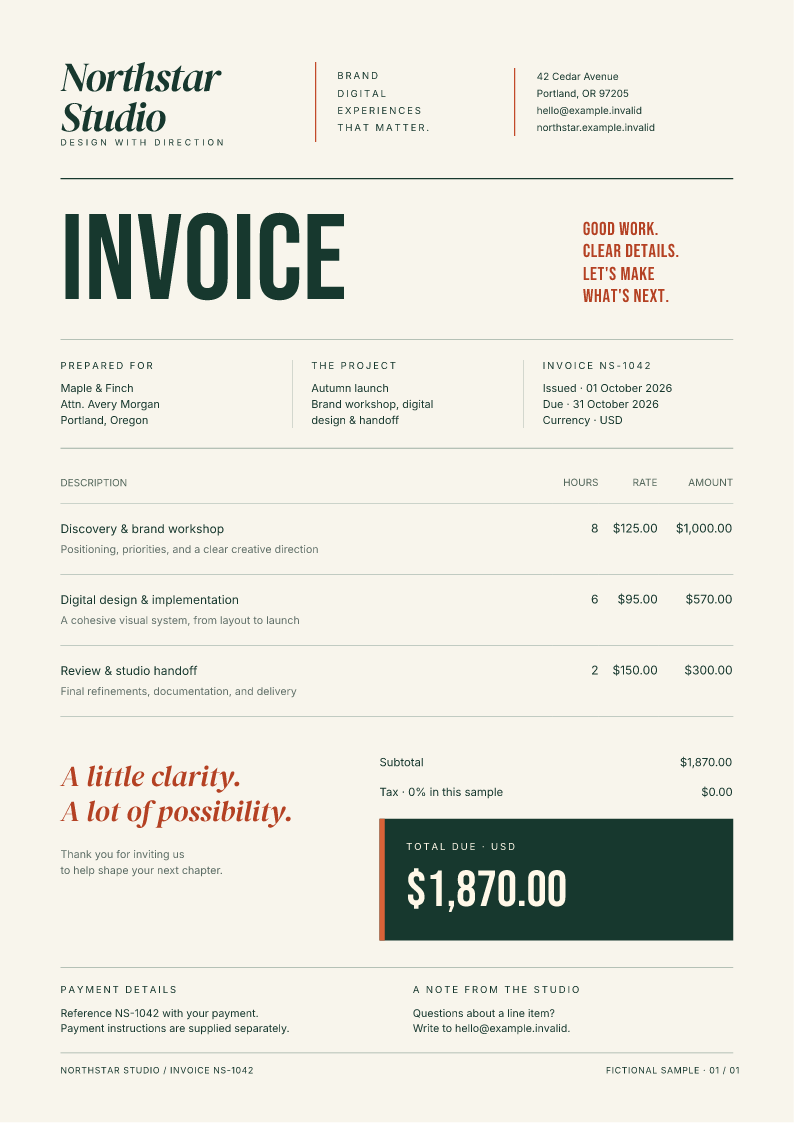
The starter serves one fictional Northstar Studio invoice. It includes a download page, editable HTML/CSS, explicit font files and their license notices, and a package lockfile. It does not contain customer data or implement billing.
Run the starter
Install the .NET 10 SDK. Extract the ZIP, open its fullbleed-aspnet directory,
and run:
Open http://127.0.0.1:5080 and choose Download sample PDF. The browser
downloads invoice-NS-1042.pdf from /invoices/NS-1042/pdf and stays on the page.
The lockfile pins the public FullBleed.DotNet 0.1.2 package, which contains
engine 2.5.6. For a console app or the broader native API, use the
C# and .NET quickstart.
Return PDF bytes as an attachment
Program.cs
checks the fixture identifier, attempts a render, and returns the bytes with:
ASP.NET's file result
sets the content type, attachment filename, and content length. A controller
can use its corresponding File(pdf, "application/pdf", filename) helper.
The application's middleware sets Cache-Control: private, no-store and
X-Content-Type-Options: nosniff on invoice responses, including failures.
The route never returns a partial PDF when rendering fails.
| Situation | Response |
|---|---|
| Known invoice renders successfully | 200 application/pdf with an attachment filename |
| Unknown fixture identifier | 404 |
| Another native render is running in this process | 503 with Retry-After: 2 |
| A font cannot cover the text, an asset is missing, or rendering fails | Generic 500 problem response |
InvoiceRenderer.cs
loads application-owned templates and registers the bundled fonts. Each render
creates and disposes its own FullBleedEngine; no native engine handle is shared
between requests. Missing-glyph diagnostics are checked before returning bytes.
A singleton renderer uses SemaphoreSlim.Wait(0) to allow one native render
per server process, with no waiting queue. The permit is released in finally
when rendering finishes, before sending the PDF to the client. Apply customer
quotas and shared admission controls separately when scaling across replicas.
Native rendering is synchronous. The request's cancellation token is checked before and after the call, but it cannot stop a call already in progress. If your workload requires a hard time or memory limit, run rendering in an isolated worker process or job service. A request timeout alone does not provide that isolation.
Change the invoice design
Edit Assets/invoice.html and Assets/invoice.css. The template uses a print
page size, CSS grid, a line-item table, color, and three explicit font families.
It makes no font or asset requests to the network.
Generate the actual PDF and a preview of its final bytes:
Inspect output/invoice.pdf, output/invoice_page1.png, and output/preview.json.
Copy the PNG to Assets/invoice.png to refresh the page's preview, then restart
the app. The project copies assets into its build and publish output.
The sample has a deliberate one-page layout. Review the rendered document after changing content, row counts, fonts, or page dimensions. The CSS coverage reference describes the engine's supported print styling.
Connect your application's records
Replace the public fixture lookup with your existing authentication and an account-scoped invoice query before connecting real customer data. An invoice identifier alone is not authorization. Keep the private response headers.
Escape values inserted into HTML, for example with WebUtility.HtmlEncode,
and format numbers and dates explicitly. Keep templates, CSS and asset paths
under application control. Avoid accepting arbitrary HTML or filesystem paths
from a request. Numbering, tax calculations and payment state belong to your
application's billing logic.
Publish the whole application
dotnet publish -c Release --no-restore -o output/publish
dotnet output/publish/FullbleedWeb.dll --urls http://127.0.0.1:5080
Deploy the complete output/publish directory, including native libraries,
templates, fonts and notices. The server needs the .NET 10 ASP.NET Core runtime.
The framework-dependent application resolves assets relative to its assembly,
so it can start from a different working directory.
The NuGet package contains win-x64, linux-x64, osx-x64, and osx-arm64
native libraries. Linux uses glibc. This starter does not establish support for
Alpine/musl, ARM Linux, trimming, single-file publishing, Native AOT, or a specific
hosting provider.
Verification you can inspect
Documentation CI downloads the package from NuGet into a fresh cache, extracts the actual starter ZIP, publishes it, and runs the published assembly outside the source project. The checks cover:
- Real HTTP downloads, attachment headers, private caching and exact PDF bytes.
- The page's PNG preview, PDF text, invoice total and one-page output.
- Unknown identifiers, encoded paths and unsupported methods.
- A concurrent request burst, busy responses, and subsequent recovery.
- Missing-glyph and missing-asset failures without document data or paths in responses.
Source and download hashes identify every file in the ZIP. Verification results record the executed checks. These are synthetic integration checks, not application authorization, capacity testing, or PDF standards certification.