Generate PDFs in Node.js
Fullbleed's optional Node package renders static HTML/CSS into PDFs using a bundled WebAssembly build of the Rust engine. It includes fonts and runs locally; you do not need Python, Rust, or a browser to use the installed package.
This guide uses Node package 0.1.0, powered by Fullbleed 2.5.4. The integration and core engine have separate versions.
Create your first PDF
With Node.js 22 or newer, install the versioned GitHub release:
npm install https://github.com/fullbleed-engine/fullbleed-node/releases/download/v0.1.0/fullbleed-0.1.0.tgz
Save this as invoice.mjs and run node invoice.mjs:
import { writeFile } from 'node:fs/promises';
import { renderPdf } from 'fullbleed';

const result = await renderPdf({
  html: '<h1>Invoice NS-1042</h1><p>Consulting: USD 1,200.00</p>',
  css: '@page { size: A4; margin: 20mm } h1 { color: #175c52 }',
  previewDpi: 96,
});

await writeFile('invoice.pdf', result.pdf);
await writeFile('invoice.png', result.previews[0]);
console.log(`${result.pages} page; engine ${result.engineVersion}`);
Open invoice.pdf or invoice.png. Inter is the default font, and previews come
from the finalized PDF. result.pdf is a Node Buffer that you can also return
from an HTTP handler or write to your storage.
CommonJS applications can use const { renderPdf } = require('fullbleed').
TypeScript declarations are included for both module styles.
Start with a designed invoice
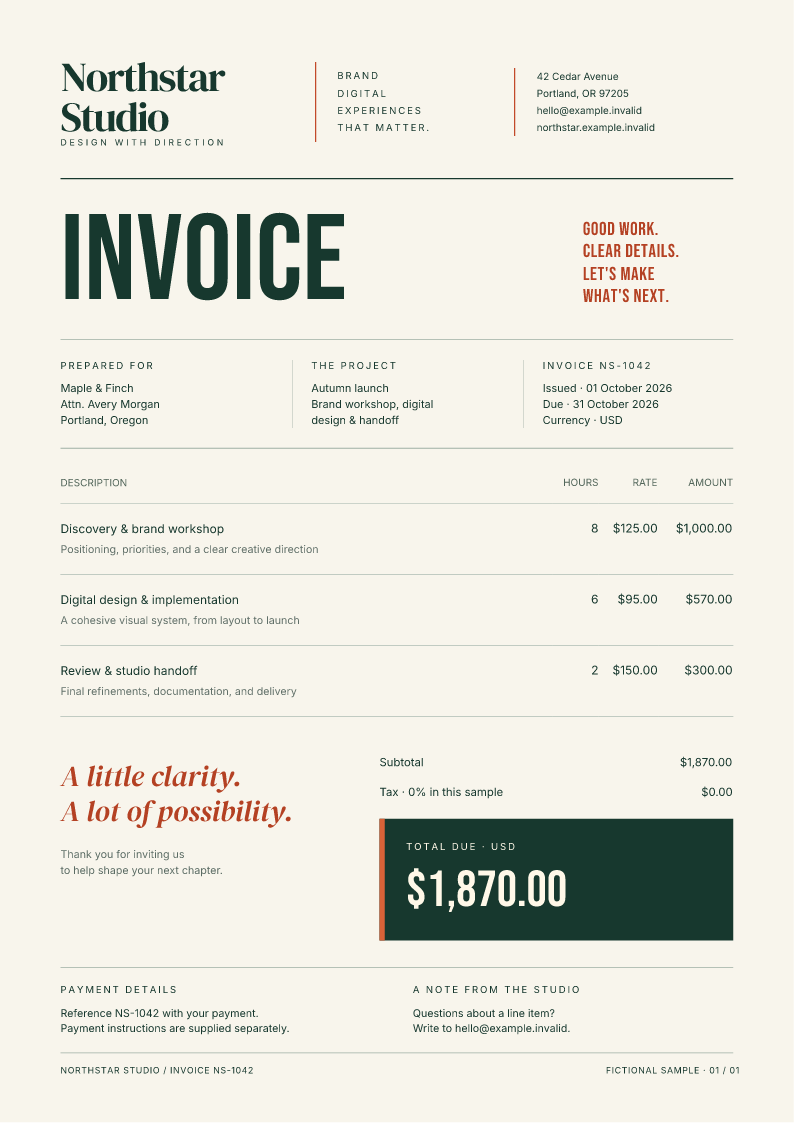
Download the Node invoice project Open its generated PDF
Extract the project and run these commands in its directory:
Open output/invoice/invoice.pdf and output/invoice/page-1.png. Edit the
customer value in render.mjs or change the HTML/CSS. The script escapes the
customer name before inserting it into the document. All example data is fictional.
The lockfile pins the package tarball and its integrity hash.
The layout uses the bundled Inter, DM Serif Display, and Bebas Neue families. You can also explore the three-page report sources.
Bring fonts and image assets
Pass additional font bytes through fonts, and use their actual family names
in CSS. Pass images through assets, mapping relative names to Buffer or
Uint8Array values. For example, an asset named brand/logo.svg is available as
assets/brand/logo.svg in your HTML.
The engine uses an in-memory filesystem for the supplied inputs and does not fetch remote URLs. Data URIs also work for document images. The package API reference includes a complete font and asset example.
Use it in an application
Rendering runs in a worker, with separate document state for concurrent calls.
Use timeoutMs, maxPages, and an AbortSignal to bound a job. Limit concurrent
calls to fit your server's memory; each worker's WebAssembly memory ceiling is
512 MiB. Preview images can use more memory than PDF-only rendering.
Failures reject with a FullbleedError and a code such as INVALID_INPUT,
MISSING_GLYPHS, PAGE_LIMIT, TIMEOUT, or ABORTED. Invalid font data is
rejected. Use registered font families: unavailable CSS families can fall back,
and the engine's glyph report does not establish visual correctness. Review the
final PDF and previews when adapting a design.
Linear-gradient fills can appear in the PDF but be absent from PNG previews in this engine version. Use solid fills when both outputs need to match.
This first Node API covers ordinary PDF rendering and previews. Use the Python API or Rust crate for profiles, template overlays, and compiled variable-data workflows. Unknown Node options are rejected. For JavaScript execution or live website behavior, use a browser.
Verification and source
The package checks real document output, failure recovery, ESM/CommonJS, and TypeScript. Its release evidence compares retained native and WebAssembly fixtures and installs the same tarball across Node 22, 24, and 26 on Windows, Linux, and macOS. These are scoped engineering checks, not PDF standards certification.
Package source and API · Versioned release and evidence · CSS coverage · Examples