Generate PDF invoices in Docker with Python
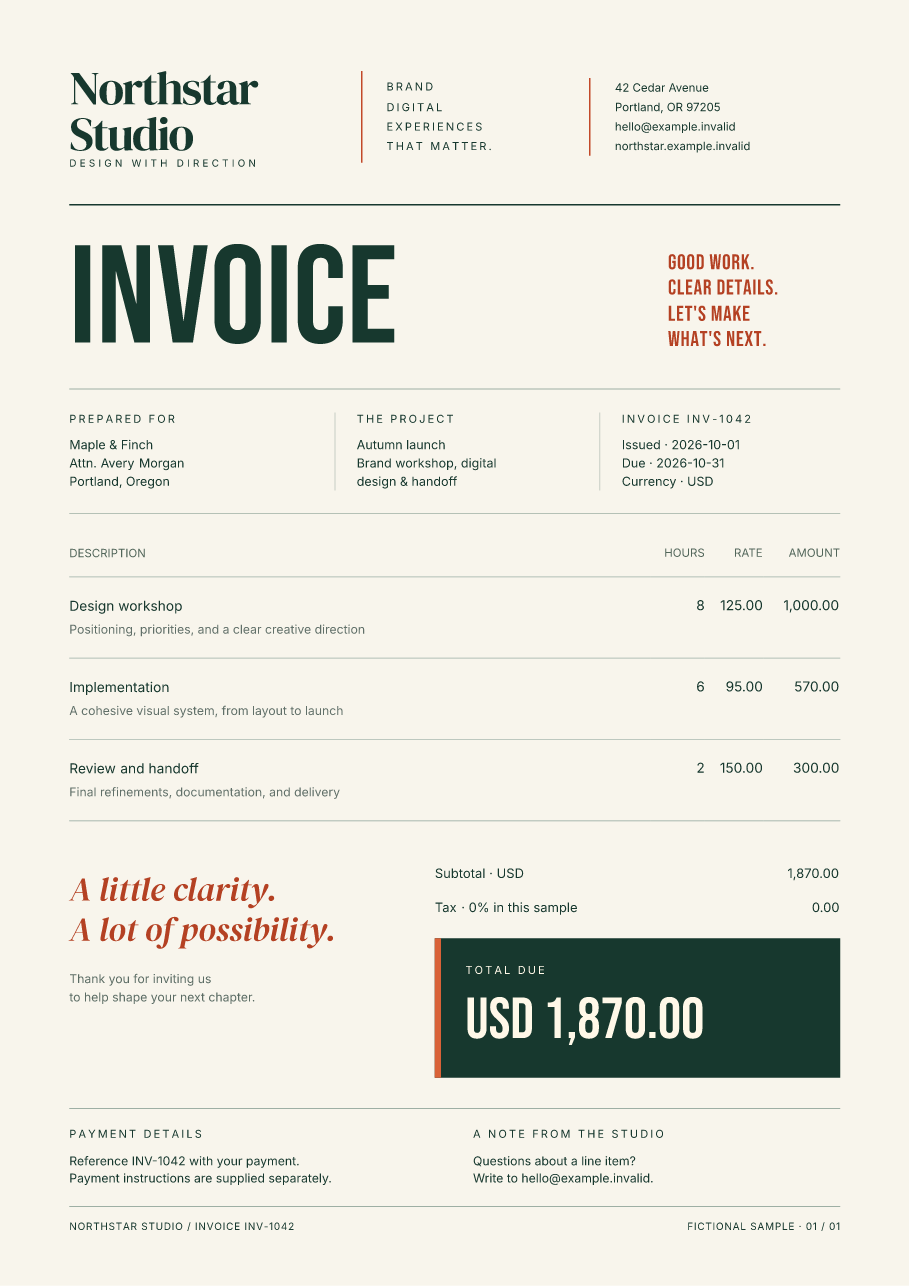
The Python invoice starter includes a Dockerfile that serves a designed PDF from FastAPI. It installs prebuilt wheels, carries its fonts with the application, and runs without adding a compiler, browser, or system PDF renderer.
Download the Docker-ready Python starter Open the sample PDF
This is the same editable HTML/CSS project used in the FastAPI, Flask, and Django guide. Its container starts the FastAPI adapter. The included invoice is fictional and has three line items; connect your application's authorized lookup before serving real records.
Build and download an invoice
Use Docker with Linux containers. Extract the ZIP and open its
fullbleed-python-invoice directory, then build the image:
Run the server with a loopback-only published port:
docker run --rm --name fullbleed-invoice --publish 127.0.0.1:8000:8000 --read-only --cap-drop ALL --security-opt no-new-privileges:true --memory 512m --cpus 2 --pids-limit 128 fullbleed-invoice
These single-line commands work in PowerShell too. Open
http://127.0.0.1:8000/ and select Download invoice, or request
http://127.0.0.1:8000/invoices/INV-1042.pdf directly. The response is an
application/pdf attachment with Cache-Control: private, no-store.
Stop it from another terminal:
Edit templates/invoice.html, templates/invoice.css, or invoice.py, rebuild
the image, and start it again to use your changes. The local source files are
copied into the image; this command does not mount them from your machine.
What the image contains
| Component | Included configuration |
|---|---|
| Python | Official Python 3.14.8 Debian Bookworm slim image, pinned by multi-platform digest |
| PDF engine | Published Fullbleed 2.5.11 wheel |
| HTTP server | FastAPI 0.142.2 and Uvicorn 0.54.0; one worker, proxy headers disabled |
| Dependencies | Exact runtime versions in requirements-docker.txt; wheel URLs and hashes in /app/pip-install.json |
| Fonts | Inter from the wheel; vendored DM Serif Display and Bebas Neue with their licenses |
| Application user | UID/GID 10001; source files owned by root |
| Build context | Explicit .dockerignore allowlist for the application, templates, fonts, and dependency files |
The install command uses --only-binary=:all:. If an appropriate wheel is
unavailable, pip stops with an installation error instead of attempting a Rust
or C build. The official Python image documentation also explains why source
builds can fail in a slim image without development tools. See
Docker's Python image reference.
The run command makes the filesystem read-only, drops Linux capabilities, disallows privilege escalation, and sets memory, CPU, and process limits. The renderer returns PDF bytes in memory; concurrent requests do not share output filenames. Builds fetch dependencies, while this render uses only local assets. See Docker's runtime options for the behavior of these settings.
Alpine and ARM64
The same Dockerfile accepts an alternate official Python image:
docker build --build-arg PYTHON_IMAGE=python:3.14.8-alpine3.24@sha256:f6a589d43c42b9e7f7dc67a12d37132491f362859a5d750607710cc56da3bc72 --tag fullbleed-invoice-alpine .
Use fullbleed-invoice-alpine as the image in the run command. The pinned slim
and Alpine image references include Linux x64 and ARM64 variants; Docker selects
the platform for your daemon.
Container CI builds and runs both images on native x64 and ARM64 runners. It checks actual downloads, four simultaneous responses, HTTP 404/405 behavior, independently extracted PDF text and embedded fonts, the native preview, and normal server shutdown. A build-context check plants dummy secret files at the root and inside asset directories, then verifies that Docker excludes them. It also renders in a separate container with networking disabled. All four resulting PDFs and previews must match.
Each run retains the PDF, PNG, build/server logs, resolved packages, wheel hashes, image ID, and runtime settings. The documentation workflow additionally builds and exercises the default image from the exact downloadable ZIP. The source record identifies that ZIP and its sample assets by hash.
Repeat the checks locally
With a local Linux-container Docker daemon and Python on the host, run from the extracted starter directory:
The output directory must be new. The script removes only its own uniquely named
containers and image tag; Docker's shared image/build cache stays under your
control. To check Alpine, pass the same pinned image reference using
--base-image. pypdf is a host-side verification dependency, separate from the
application image.
Connect it to your deployment
Replace the fictional load_invoice() with your application's authorized record
lookup. Configure TLS, trusted reverse proxies, request limits, monitoring, and
worker or job-queue capacity in your hosting setup. The example's resource limits
are test settings, not a throughput or sizing recommendation. The route has no
authentication, and the fixed one-page layout needs pagination work for long
invoices.
Update the pinned image and dependency versions periodically, then rebuild and rerun the checks. These checks establish the behavior of the included container and fixture; they do not establish production capacity or PDF standards conformance. For larger document jobs, use a queue and store the finished PDF; the variable-data guide covers compiled document families.
Python installation · FastAPI, Flask, and Django · Editable invoice data