Chinese text in a PDF
Register a font file containing your characters, then select that family in CSS.
Fullbleed reads project fonts directly. A CSS name such as "Noto Sans SC" or
"PingFang SC" does not install, download, or find a font on your computer.
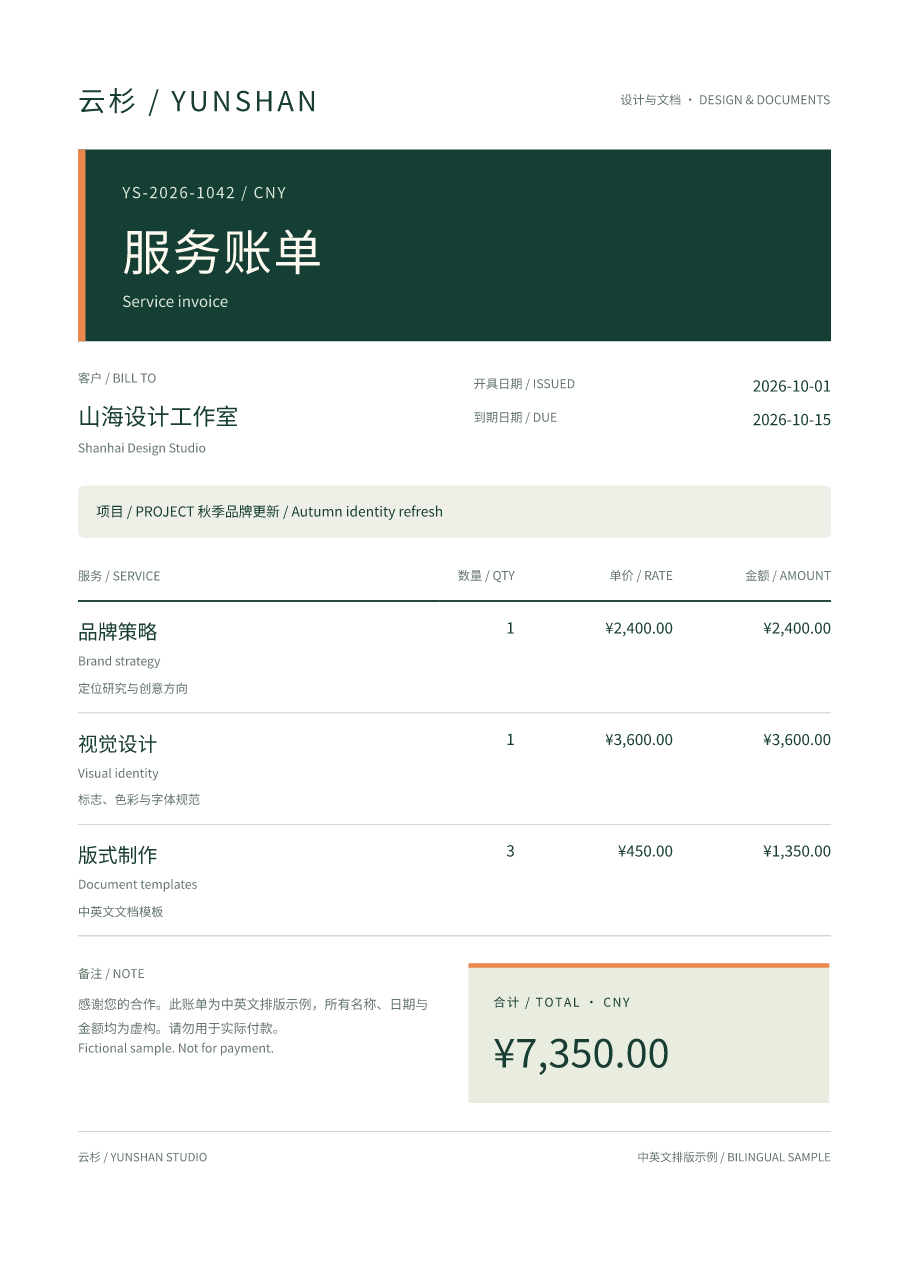
This fictional invoice combines horizontal Simplified Chinese and English, currency, a wrapping note, and a styled table. It uses Fullbleed 2.5.8 and an explicit regular-weight Noto Sans SC font. The image below comes from the actual PDF.
Download the PDF Get the runnable project
Run the example
Extract the project ZIP, open its
chinese-invoice directory, and use a Python 3.11 or newer virtual environment:
python -m pip install -r requirements.txt -r requirements-fonts.txt
python prepare_font.py
python render.py
The preparation step downloads a pinned 17.8 MB font from Google Fonts, checks its SHA-256, and produces a static regular face. It can take about a minute. The script reuses a verified prepared font on subsequent runs.
Open output/invoice.pdf and output/preview/invoice_page1.png. Edit data.json
for the customer, dates, services, and integer CNY cents. Edit invoice.css for
colors, margins, spacing, and type sizes. render.py escapes the data and
calculates the line amounts and total before laying out the page.
Font preparation uses fontTools; rendering the prepared project requires only
Fullbleed. For offline deployment, copy the prepared fonts/ directory with
the project and install requirements.txt. The renderer makes no font downloads
and needs no system-font installation.
Register the file before selecting its family
This smaller example runs from the same prepared project directory:
from pathlib import Path
import fullbleed

engine = fullbleed.PdfEngine(
    font_files=["fonts/NotoSansSC-Regular.ttf"],
    document_title="中文示例 / Chinese example",
    document_lang="zh-CN",
)
html = '<html lang="zh-CN"><body><h1>中文示例</h1><p>项目、数量、价格 / Items, quantity, price</p></body></html>'
css = '''
@page { size: A4; margin: 20mm; }
body { font-family: "Noto Sans SC"; font-size: 12pt; line-height: 1.6; }
h1 { font-weight: 400; }
'''
pdf, missing = engine.render_pdf_with_glyph_report(html, css)
if missing:
    raise RuntimeError(f"The registered fonts lack required characters: {missing}")
Path("chinese.pdf").write_bytes(pdf)
engine.render_finalized_pdf_image_pages_to_dir("chinese.pdf", "preview", 110, "chinese")
Save Python, JSON, HTML and CSS text as UTF-8. document_lang="zh-CN"
describes the document language; it does not supply glyphs or repair text that
was decoded incorrectly.
The project includes the original SIL OFL license and a font provenance manifest. Keep the font license when redistributing your prepared assets.
Choose an actual font weight
The pinned Google Fonts source is variable, with a default weight of 100. Fullbleed 2.5.8 renders variable fonts at their default instance. Naming weight 400 in CSS does not move that font's variation axis.
The preparation script uses the
fontTools instancer
to create a static face at wght=400, update its face names, and verify the
resulting hash. It retains the source font's full character repertoire. This
design uses weight 400 throughout; size, color, and spacing provide hierarchy.
For a different weight, prepare its actual static face and use
explicit face mappings.
Check coverage and the final page
The renderer saves glyph-report.json and stops before writing a new PDF when
the registered font lacks a character. Its hash check also catches an absent
or changed font file. An empty glyph report is not sufficient when no font
was registered: the current engine skips coverage reporting in that case.
Coverage is one check. Open the PDF, inspect every preview, and check extracted text too. This catches different problems: a font can contain every character while the input encoding, line breaks, or document layout still need correction. If text appears as squares or question marks, check the actual registered font, the selected family, and the original Unicode text first.
The retained verification exercises the downloaded ZIP, font preparation, repeated rendering, edited customer text, an absent font, and an unsupported character. Independent PDF tools check the Chinese and English text, amounts, one-page A4 size, embedded regular font, and glyph bounds. Both Fullbleed and PDFium previews were inspected.
This recipe verifies its Simplified Chinese/English sample. Use representative content and appropriate fonts for other languages or regional glyph forms; this is not a claim of universal language support, vertical writing, or PDF standards conformance.