PDF invoice downloads with Rust and Axum
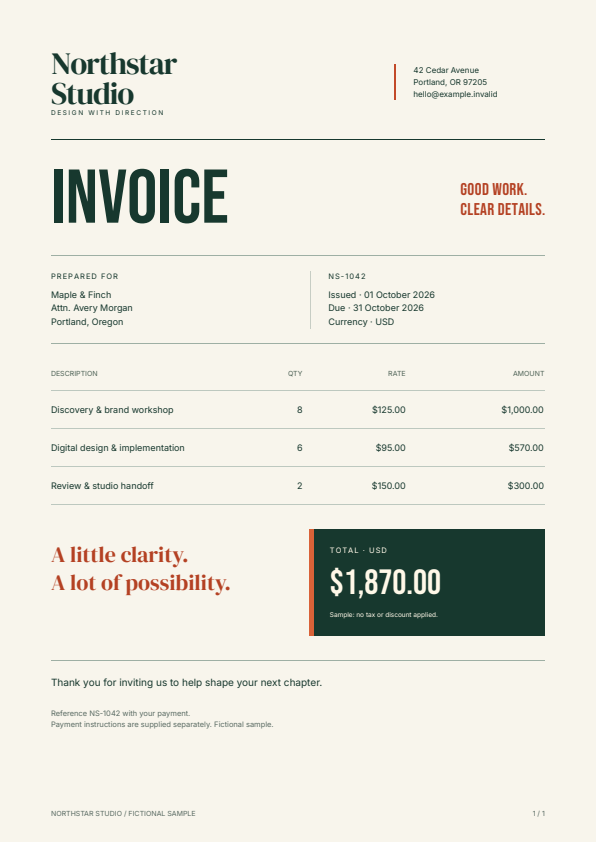
Add a PDF response to a Rust application. This example accepts invoice JSON, fills an editable HTML/CSS template, and returns a downloadable document. It uses the public Fullbleed 2.5.19 crate with Axum, Tokio, and MiniJinja.
Download the Axum project Open the generated invoice Source and checksums
Run it locally
Use Rust 1.85.0 or newer with a native toolchain. Extract the ZIP, open a
terminal in fullbleed-axum-starter, and run:
Open localhost:3000. The form loads fictional invoice data. Change a customer or line item, then choose Download PDF. The initial three-item invoice totals $1,870.00.
The first Cargo build needs internet access. Rendering uses this project's local fonts and templates. Requests and generated PDFs are kept in memory; the server does not write document files or log customer data.
If port 3000 is occupied, set PDF_BIND to another loopback address, such as
127.0.0.1:3100, before starting the application.
Call the endpoint
With the server running, open another terminal in the project directory:
curl --fail-with-body --request POST http://127.0.0.1:3000/invoices/pdf --header "Content-Type: application/json" --data-binary "@sample.json" --output invoice.pdf
Use curl.exe in PowerShell. After a successful request, open invoice.pdf.
The response includes Content-Type: application/pdf, an attachment filename
derived from the validated invoice number, and Cache-Control: private, no-store.
sample.json separates data from presentation:
{
  "invoice_number": "NS-1042",
  "issued": "01 October 2026",
  "due": "31 October 2026",
  "customer": {
    "name": "Maple & Finch",
    "address_lines": ["Attn. Avery Morgan", "Portland, Oregon"]
  },
  "items": [
    {"description": "Discovery & brand workshop", "quantity": 8, "unit_price_cents": 12500},
    {"description": "Digital design & implementation", "quantity": 6, "unit_price_cents": 9500},
    {"description": "Review & studio handoff", "quantity": 2, "unit_price_cents": 15000}
  ],
  "note": "Thank you for inviting us to help shape your next chapter."
}
Prices are integer USD cents. The application computes line amounts and totals without floating-point arithmetic. It displays the supplied dates and applies no tax, discount, or payment-date calculation.
Edit the HTML and CSS
Open templates/invoice.html and templates/invoice.css. Change the branding,
typography, colors, or document sections, then restart the server. The template
receives the invoice data plus display-ready items and total:
{% for item in items %}
<tr>
  <td>{{ item.description }}</td>
  <td class="number">{{ item.quantity }}</td>
  <td class="number">{{ item.unit_price }}</td>
  <td class="number">{{ item.amount }}</td>
</tr>
{% endfor %}
MiniJinja's HTML autoescaping is explicitly enabled. A customer string containing
<b> stays text in the PDF. Keep escaping enabled and avoid marking untrusted
values safe. Requests supply data; templates and font files are controlled by
the application.
The table uses fixed column widths and explicit wrapping so long descriptions
do not push prices off the page. Rows continue over additional pages, with a
repeated table header and page counters. The included font files have license
notices; register any additional fonts in AppState::load and select them in CSS.
Characters absent from the configured fonts produce a validation error.
Read CSS coverage when adapting an existing web template. For file-based rendering without HTTP, use the Rust starter.
Keep rendering work bounded
PDF generation is synchronous CPU work. The handler moves it to
Tokio's blocking pool
and admits at most two render jobs at a time. When both slots are occupied, it
returns 503 with Retry-After: 1 instead of accumulating PDF jobs.
The semaphore permit lives inside the blocking closure. Disconnecting the HTTP request does not free capacity while its render is still running. A started blocking task cannot be aborted; use a separate worker process if your application requires hard execution deadlines or native-crash containment.
The endpoint also applies a 64 KiB body limit, at most 200 line items, and explicit bounds on text, quantities, and prices. It rejects unknown JSON fields, control characters, and unsafe filenames. The README lists the limits and error responses. Change them with your workload and retained output checks in mind.
This local integration example includes no authentication, tenant authorization, TLS, durable queue, or payment logic. Add your application's access controls before exposing it beyond loopback. No hosted service or account is needed to try the download.
Verification and source
Run the concurrency and validation tests in the extracted project:
The download verifier extracts the exact ZIP outside the checkout and runs the real server. It checks HTTP response headers, repeated output, escaped text, multi-page tables, maximum-sized invoice data, invalid requests, missing fonts, template edits, and recovery. Independent PDF readers check text, page counts, and visible character positions, and render every checked page. Browser tests exercise actual downloads, form errors, recovery, and the mobile layout.
The controlled Rust concurrency tests check occupied capacity, request cancellation, render errors, and worker panics. They verify lifecycle behavior; they do not establish production throughput or PDF standards conformance.
Runnable source · Documentation CI · Axum documentation · MiniJinja documentation
This guide and example were written with AI coding assistance for Fullbleed. All sample business details and prices are fictional.