Arabic and English in one PDF
Write Arabic in its normal Unicode order, register an Arabic font, and give Arabic blocks a right-to-left direction. Isolate dates and references so their left-to-right order survives the surrounding Arabic text.
This fictional invoice uses Fullbleed 2.5.14, static Noto Sans Arabic regular and bold fonts, and Inter. The download includes the fonts and their license. The image below is rendered from the actual PDF.
Download the PDF Get the runnable project
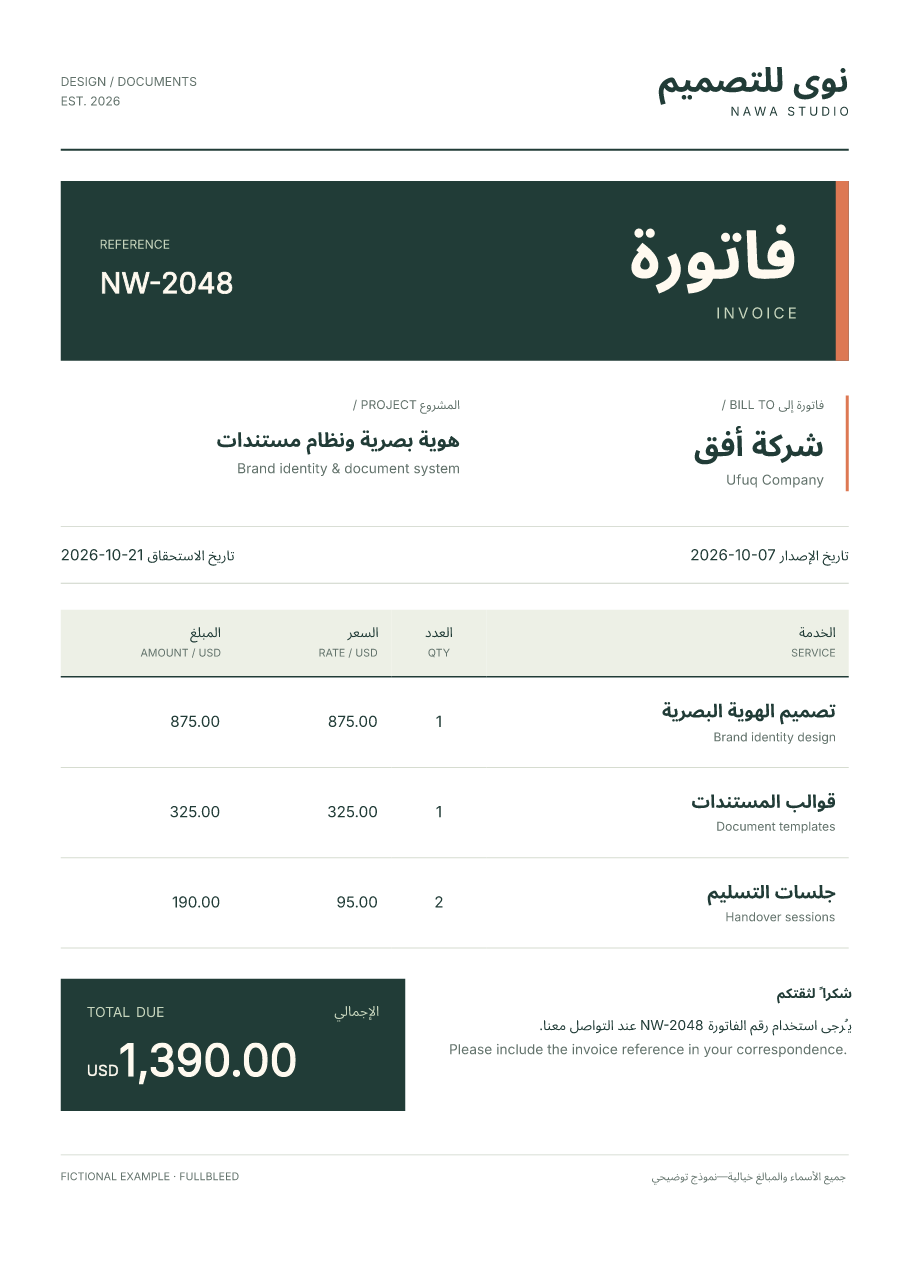
Run and customize it
Extract the ZIP and open its arabic-invoice folder. In a Python 3.11 or newer
virtual environment, run:
Open output/invoice.pdf and output/preview/invoice_page1.png. Rendering reads
local font files and needs no browser, network access or system-font installation.
Edit data.json for the studio, customer, dates, reference and services. Amounts use integer USD cents; the renderer calculates each line and the total and escapes inserted HTML text. Edit invoice.css for colors, typography, spacing and layout. The HTML structure is in render.py.
Keep fields in the intended direction
This smaller example runs from the extracted project directory:
from importlib.resources import files
from pathlib import Path
import fullbleed

engine = fullbleed.PdfEngine(
    font_files=[
        "fonts/NotoSansArabic-Regular.ttf",
        str(files("fullbleed_assets").joinpath("fonts/Inter-Variable.ttf")),
    ],
    document_lang="ar",
    document_title="Arabic and English example",
)
html = '''<html lang="ar"><body>
<p dir="rtl">مرحباً بالعالم</p>
<p dir="rtl">رقم الفاتورة <bdi dir="ltr">INV-2048</bdi>
مستحق في <bdi dir="ltr">2026-10-21</bdi>.</p>
</body></html>'''
css = '''
@page { size: A4; margin: 20mm; }
body { font-family: "Noto Sans Arabic", Inter; font-size: 18pt; line-height: 1.8; }
p { text-align: right; }
bdi { font-family: Inter; }
'''
pdf, missing = engine.render_pdf_with_glyph_report(html, css)
if missing:
    raise RuntimeError(f"Project fonts lack required characters: {missing}")
Path("arabic.pdf").write_bytes(pdf)
engine.render_finalized_pdf_image_pages_to_dir("arabic.pdf", "preview", 110, "arabic")
text-align: right chooses an edge; direction: rtl establishes the text's base
direction. An inline direction: ltr declaration alone does not isolate a date.
Use <bdi dir="ltr">, or combine direction: ltr with unicode-bidi: isolate
in CSS. Fullbleed resolves styled siblings in the surrounding paragraph's bidi
context. See the HTML bidirectional-text defaults.
Do not manually reverse Arabic strings. Keep a connected Arabic word together when styling it; this example does not test splitting its letters into separate styled spans. Save Python, JSON, HTML and CSS as UTF-8.
Fonts and output checks
Naming a CSS font family does not install it. This project registers the exact
regular and bold files included in its font manifest.
render.py verifies their hashes before rendering. Keep the included OFL notice
when distributing those fonts. Inter is registered from the installed Fullbleed
package. document_lang="ar" describes the document language; it supplies no glyphs.
The retained checks exercise the ZIP, an edited invoice and theme, exact-input replay, the guide snippet, missing and changed fonts, and an unsupported character. Independent readers inspect the Arabic and English text, dates, total, embedded fonts and page bounds; native and PDFium previews are retained too.
Inspect the final pages after customization. PDF readers can reconstruct a mixed Arabic/English line differently on copy/paste; one reader's full extracted line is not a substitute for checking field geometry and text with another. This recipe verifies its sample, without a general language-coverage or PDF standards-conformance claim.
Invoices from data · Font registration · Chinese text and fonts