Generate PDF invoices in AWS Lambda
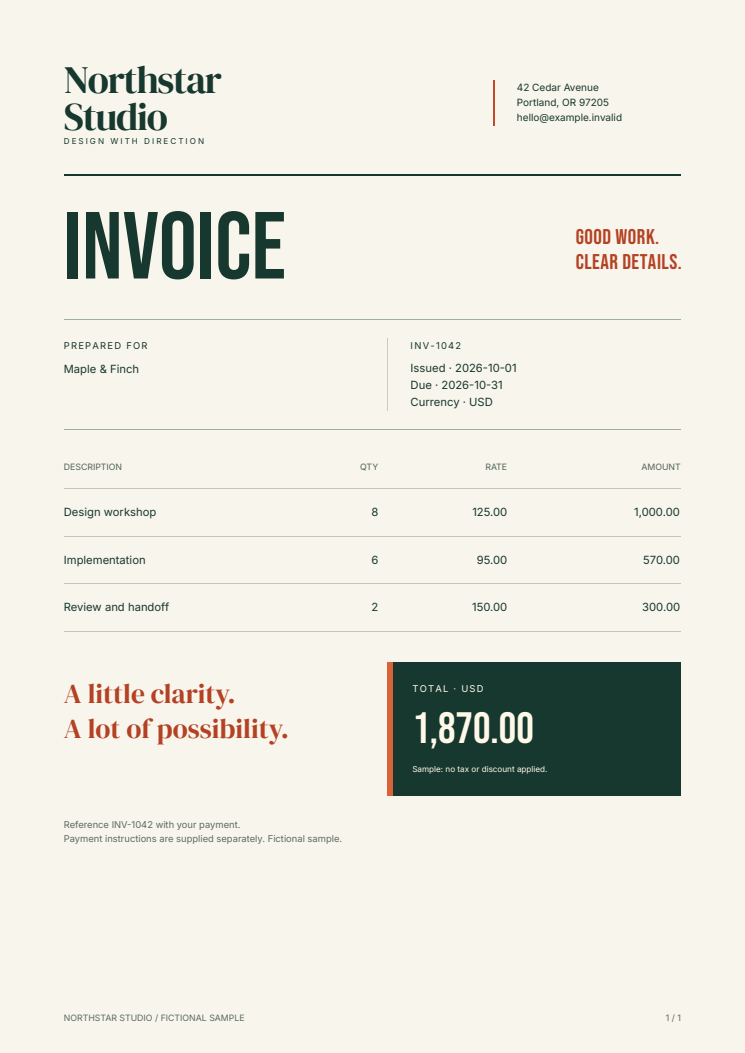
Generate an invoice from JSON inside a Python Lambda container. This starter uses Fullbleed 2.5.20, explicit fonts, and editable HTML/CSS. It renders PDF bytes in memory, without installing a browser or system fonts.
Download the Lambda starter Open the sample PDF
Try the Lambda runtime locally
Extract the ZIP and open fullbleed-lambda-starter. You need Docker with Linux
containers, Buildx, and Python 3.10 or newer for the client. The local path needs
no AWS account.
docker buildx build --platform linux/amd64 --provenance=false --load --tag fullbleed-lambda .
docker run --rm --name fullbleed-lambda --publish 127.0.0.1:9000:8080 --read-only --tmpfs /tmp:rw,size=64m --user 10001:10001 --cap-drop ALL --security-opt no-new-privileges:true --memory 512m --cpus 2 --pids-limit 128 fullbleed-lambda
In a second terminal in the same project directory:
Open output/invoice.pdf. Change customer details or line items in sample.json
and run the client again. Edit templates/invoice.html and invoice.css, then
rebuild the image, to change the design. Rows flow onto further pages and repeat
the table header; page numbers appear in the footer.
Stop the local container with docker stop fullbleed-lambda when finished.
The README includes the native ARM64 build command and both image digests.
The pinned AWS Python 3.13 base image supplies the Runtime Interface Client and Emulator. Follow AWS's image instructions for Docker prerequisites and architecture selection.
From invoice data to a PDF response
The handler accepts POST /invoices using the Function URL payload format 2.0.
The JSON body includes an invoice number, customer, dates, and line items:
{
  "number": "INV-1042",
  "customer": "Maple & Finch",
  "issued": "2026-10-01",
  "due": "2026-10-31",
  "items": [
    {"description": "Design workshop", "quantity": 8, "unit_price": "125.00"}
  ]
}
Text is escaped before insertion into the application-owned template. Prices are decimal strings; totals use decimal arithmetic. The starter limits decoded JSON to 64 KiB and accepts at most 100 rows, with bounded text, quantities, and prices. It rejects unsupported fields and reports validation failures as JSON. It does not calculate tax, discounts, or payment status.
The PDF response has Content-Type: application/pdf, an attachment filename,
Cache-Control: private, no-store, a base64 body, and isBase64Encoded: true.
A deployed Function URL maps this envelope into an HTTP response; the local
emulator returns the envelope itself, which the included client decodes.
See AWS's request and response format.
The 4,000,000-byte PDF limit leaves room for encoding within a buffered response. For larger documents, use application-controlled storage and return a download reference; Lambda's payload limits apply independently of available memory.
Connect a service or automation
The included CloudFormation template takes an already-pushed, single-architecture
ECR image digest. It configures a 512 MiB function, a 30-second timeout, two
reserved concurrent executions, and an AWS_IAM Function URL. The README gives
the deployment command and a synchronous AWS CLI invocation that saves the PDF.
Deployment uses your AWS account and may incur charges.
Call the function from an authorized service after loading the intended order or invoice. Keep customer/tenant authorization in that service. For scheduled or queued work, add durable output storage, idempotency, retries, and delivery to your application's job workflow. An asynchronous invocation does not deliver the handler's returned PDF to its caller.
The Function URL requires signed requests and appropriate caller permissions; it is not an anonymous browser download link. See AWS's access controls. The starter stores no invoice data or PDFs between calls and reads its fonts and templates from the image.
What is verified
The download verifier extracts the published ZIP and invokes AWS's runtime emulator on native Linux x86-64 and ARM64. It checks binary response envelopes, escaped text, decimal totals, repeated output, warm-invocation isolation, multi-page and maximum-size invoices, invalid input, and recovery. Independent PDF readers check text and page geometry and rasterize every successful output. The container runs as a numeric user with a read-only root filesystem and a writable temporary directory.
The template passes cfn-lint schema checks. No hosted AWS deployment, IAM
enforcement, cloud performance, or pricing result is claimed. AWS's emulator
does not reproduce its orchestrator or security configuration.
Runnable source · Download manifest · Verification record · Documentation CI
For a conventional HTTP service, use the Python Docker starter. For document layout and explicit assets, start with the Python quickstart. This guide was written with AI coding assistance for Fullbleed. All sample business details and prices are fictional.