Generate PDF invoices in n8n
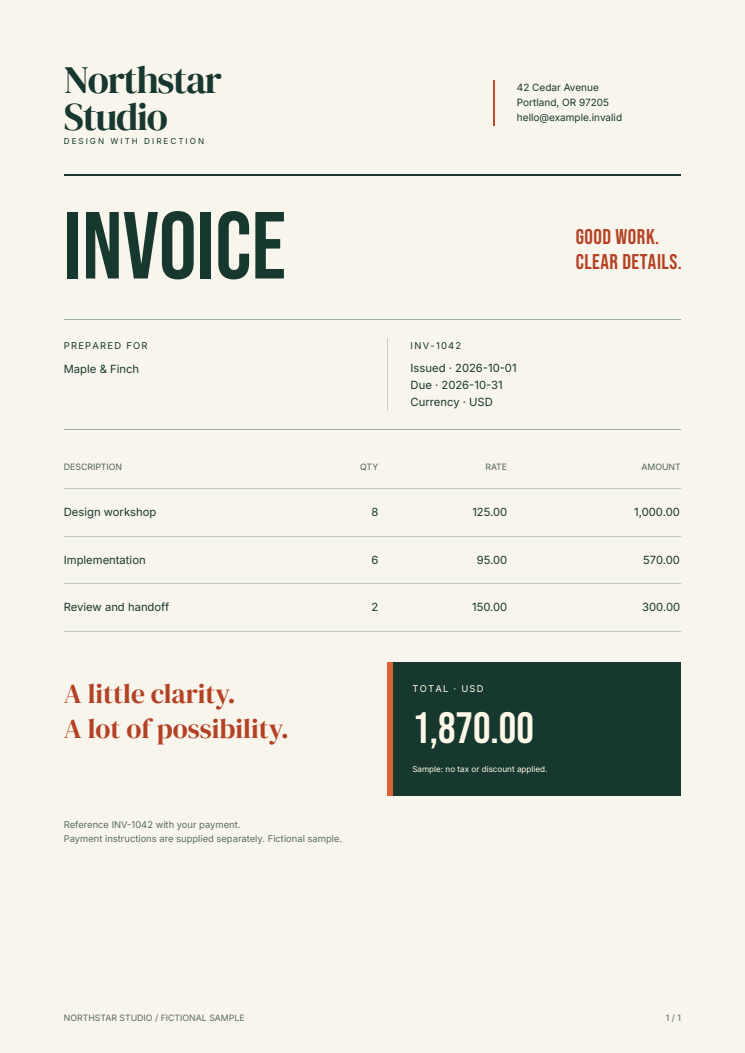
Send invoice data to a webhook and receive a PDF attachment. This example keeps automation in n8n and document layout in editable HTML/CSS. Fullbleed renders the PDF in a separate container using explicit fonts and the published Python wheel.
Download the complete n8n kit Download workflow JSON Open the sample PDF
Run the complete example
Use Docker with Linux containers and Docker Compose v2. Extract the ZIP, open
fullbleed-n8n-starter, and start the two services:
Open http://localhost:5678 and create your local n8n owner account. Create a
workflow, choose Import from File in its menu, and select
workflows/invoice-webhook.json. Save and publish it.
Send the included fictional invoice from the extracted directory:
Open the PDF, change sample.json, and send another invoice using a new output
filename. The client saves only a successful PDF response. It does not overwrite
an existing file.
The kit publishes n8n on loopback only. Its renderer is available at
http://renderer:8000/invoices inside the private Compose network.
The workflow's webhook has no authentication; keep this local example private.
An owner-account login does not authenticate an unprotected webhook.
Stop the services with docker compose down. n8n's account and workflow settings
remain in its named volume for your next session.
Follow the binary data
The workflow uses built-in nodes:
| Node | What it does |
|---|---|
| Receive invoice | Accepts one invoice in a POST request body |
| Render PDF | Sends that body as JSON to the renderer; stores the response in binary field pdf |
| PDF received? | Requires HTTP 200 and a PDF content type |
| Return PDF | Returns the pdf binary field as an attachment |
| Return validation error | Returns a JSON error for rejected input or an unexpected response |
| Return service error | Returns HTTP 502 when the renderer cannot be reached |
The HTTP Request node uses Response Format: File, Put Output in Field: pdf, and Include Response Headers and Status. Its Never Error option lets the following condition inspect rejected HTTP responses. Transport failures use its separate error output. The workflow does not pass those errors into the PDF branch. These controls are described in n8n's HTTP Request documentation and Respond to Webhook documentation.
To upload or deliver the document, connect your destination node to the successful branch and select pdf as its binary input. Configure its credentials in your n8n instance. No email, storage account, or other destination is configured by this example.
Customize the invoice
Edit renderer/templates/invoice.html and invoice.css, then rebuild with the
same Compose command. Fonts and licenses are included under renderer/fonts.
Tables can span pages, repeat their header, and use page counters.
Each invoice has number, customer, issued, due, and items. Prices are
decimal strings and quantities are integers:
{
  "number": "INV-1042",
  "customer": "Maple & Finch",
  "issued": "2026-10-01",
  "due": "2026-10-31",
  "items": [
    {"description": "Design workshop", "quantity": 8, "unit_price": "125.00"}
  ]
}
The renderer escapes input text, validates dates and field types, accepts up to 100 line items, and bounds request and output size. The README gives every field limit. This sample calculates line totals and their sum; it has no tax, discounts, currency conversion, or payment processing.
Connect an existing installation
Import the workflow JSON and set the renderer URL to an endpoint reachable from your n8n server. An n8n Cloud instance cannot reach the kit's private local network. Keep this destination under workflow-author control; do not accept an arbitrary renderer URL or template from a caller.
Before handling real records, authenticate the trigger, authorize invoice access, configure TLS and limits, and protect the renderer endpoint. Use n8n's credential store for secrets and your own execution/binary-data retention policy. The local kit disables saved execution data. The renderer uses an internal network; n8n also has an ordinary network for its loopback port and outbound integrations.
For durable background jobs, add persistent job/output storage, retries, and idempotency based on the invoice and template version. A repeated webhook call renders again. It does not prevent duplicate downstream delivery.
What is checked
The download verifier imports the exact workflow into n8n 2.42.5, publishes it, and sends synthetic requests through the real webhook. It checks returned PDF bytes and filenames, decimal totals, escaped text, multi-page invoices, concurrent requests, invalid input, renderer unavailability, and recovery. Independent PDF readers check content and page geometry and rasterize the outputs. The browser check opens the imported workflow in the n8n editor.
The renderer uses Fullbleed 2.5.20. Both container images are pinned by digest. This is a local integration example; the checks do not establish production capacity, hosted delivery, or n8n marketplace approval.
Runnable source · Source manifest · Documentation CI · Python in Docker · AWS Lambda
This Fullbleed example was written with AI coding assistance. It is not affiliated with or endorsed by n8n.