Build PDFs with Python components
Write functions that return document components. Pass data as arguments, nest children, map over records, and use ordinary Python conditions. Fullbleed serializes the tree and renders it with your styles and explicit engine. You do not need to write HTML strings.
The model is inspired by React's function components and composition. Python evaluates these functions directly to produce static print documents. There is no browser, virtual DOM, hook lifecycle, or JavaScript runtime involved. The complete workflow below uses Fullbleed 2.5.25.
The JavaScript component workflow brings named components, attached styles and optional JSX/TSX to Node and browser applications. It does not include Python's semantic validator or promise complete API parity.
Download the complete project Open the component invoice
A component is a function
from importlib.resources import files
from pathlib import Path
import fullbleed
from fullbleed.ui import (
    Document, Heading, Paragraph, Strong, Stack, StyleSheet, component,
)

@component
def Line(*, label: str, amount: str):
    return Paragraph(Strong(label), ": ", amount)

invoice_styles = StyleSheet({
    "@page": {"size": "A4", "margin": "18mm"},
    "body": {"font_family": "Inter", "color": "#233c36"},
    "h1": {"font_size": "32pt", "letter_spacing": "-1pt"},
    "p": {"margin": 0},
})

@Document(title="Invoice", styles=invoice_styles)
def Invoice(customer: str, items: list[dict]):
    return Stack(
        Heading("Made for ", customer, level=1),
        [Line(label=item["label"], amount=item["amount"]) for item in items],
        gap="12pt",
    )

font = files("fullbleed_assets").joinpath("fonts/Inter-Variable.ttf")
engine = fullbleed.PdfEngine(font_files=[str(font)])
invoice = Invoice("Maple & Finch", [
    {"label": "Design", "amount": "$120.00"},
    {"label": "Review", "amount": "$40.00"},
])
Path("invoice.pdf").write_bytes(invoice.render_pdf(engine))
Path("invoice.png").write_bytes(invoice.render_image_pages(engine, dpi=96)[0])
@component preserves the function and its signature. It is optional for your
own components. @Document wraps a component in a document artifact and preserves
its callable signature, annotations and docstring.
Apply @Document to the outer component; use ordinary functions or @component
for nested pieces. Nesting a document artifact raises a clear error.
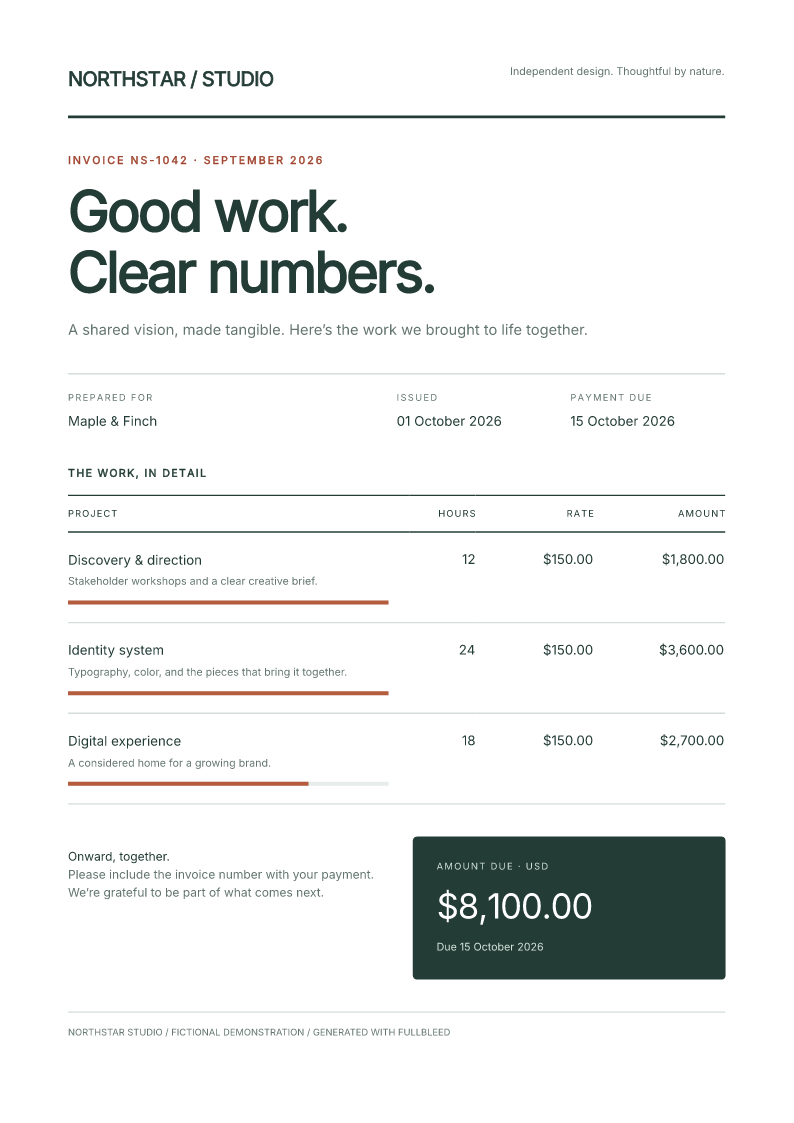
The designed invoice includes reusable fields, table rows, a total panel, paid/unpaid variants, and styling written in Python.
Props, children and rich text
Props are normal Python arguments. Wrappers accept positional children and forward named props to an underlying component:
from fullbleed.ui import Card, Heading, Paragraph, Strong, component

@component
def Panel(*children, title: str, **props):
    return Card(Heading(title, level=2), *children, **props)

panel = Panel(
    Paragraph("Prepared for ", Strong("Maple & Finch")),
    title="Project summary",
    style={"padding": "18pt", "background": "#f2f6f3"},
)
Text and attribute values are escaped. "<strong>hello</strong>" prints
literally; use Strong("hello") for emphasis. Rich text accepts multiple children,
including Text("Total: ", Strong("$40")).
Nested lists, tuples and ordered generators become children. Generators are
consumed once when constructing an element, so validation and repeated rendering
see the same tree. None, False and True omit children; numeric zero remains.
Write str(flag) when a boolean should be visible.
from fullbleed.ui import Fragment, Paragraph

body = Fragment(
    [Paragraph(row["description"]) for row in rows],
    paid and Paragraph("Paid in full."),
)
Call component functions explicitly. Functions, mappings, sets and byte buffers are rejected as children instead of printing Python representations. Cycles and content inside void elements also fail clearly.
Named building blocks
| Purpose | Components |
|---|---|
| Text | Text, Paragraph, Strong, Emphasis, Heading, LineBreak |
| Structure | Fragment, Box, Header, Footer, Section |
| Layout | Stack, Row, LayoutGrid, Inline, Center, Card, Spacer, Divider |
| Tables | Table, TableCaption, THead, TBody, Tr, Th, Td |
| Lists and media | List, ListItem, ListItems, Image, Link |
| Patterns | Badge, SectionHeader, KeyValueRow, PriceRow, IconLabel |
Heading(..., level=1) uses a real heading; levels are integers from 1 to 6.
Image(src="assets/chart.png", alt="Revenue by quarter") requires an explicit
text alternative. Table headers accept scope="col" or scope="row".
See semantic authoring for structural validation and
accessibility workflows. el(...) remains a lower-level escape hatch; the
complete invoice example does not need it.
Layout and style composition
Stack(..., gap="12pt"), Row(..., justify="space-between", wrap=True), and
LayoutGrid(..., columns=3, gap="10pt") turn layout props into CSS. Grid columns
can also be a track string such as "2fr 1fr". These props establish the display
mode. A supplied style= overrides their declarations.
Element styles accept mappings, CSS strings, or composed fragments:
from fullbleed.ui import Paragraph, style, pt

base = style(font_size=pt(10), color="#233c36")
important = Paragraph("Due today", style=style(base, font_weight=700))
style(base, ...) leaves base unchanged. Repeated properties use the last
authored value and move to the end. Snake-case names become kebab-case; CSS custom
properties keep their case. Units are explicit: write "12pt" or pt(12).
Quoted strings, comments, function arguments and data URLs retain their
declaration boundaries during style composition.
StyleSheet maps selectors to style values. Compose shared sheets and overrides
with StyleSheet(shared, overrides); rule order uses the normal CSS cascade.
Mappings support declaration rules such as @page. Use a CSS string for nested
at-rules.
Artifact rendering includes small layout defaults for rows, stacks, grids,
inline groups, centers, cards and tables. It loads no theme or fonts. Your rules
follow the defaults. Set include_component_styles=False on @Document for
complete control, or call component_styles() in a separate rendering pipeline.
Rendering and exporting
Construct PdfEngine explicitly to choose fonts, assets, profiles and diagnostics.
PDF and PNG methods use the same component and style path:
pdf = invoice.render_pdf(engine, a11y_mode="raise")
pages = invoice.render_image_pages(engine, dpi=96)
invoice.emit_artifacts(
    html_path="output/invoice.html",
    css_path="output/invoice.css",
)
The HTML export links its emitted stylesheet for browser inspection.
to_html() alone serializes HTML; it does not embed styles or make the engine
fetch CSS URLs. to_css() returns composed CSS separately. Existing
engine.render_pdf(artifact.to_html(), css) calls retain their explicit styling.
Set actual paper geometry with @page or engine options. The decorator's existing
page and margin fields remain authoring metadata. HTML title/language and
engine-level PDF metadata are separate; configure the latter on the engine when
a profile requires it.
a11y_mode="raise" checks structural semantics, not PDF/UA conformance.
Review final output and use the relevant delivery verifier. Component names,
selectors, CSS and URL destinations are developer-authored inputs. Escaping data
does not turn this API into an HTML sanitizer.
Compatibility and other languages
Existing helpers, decorators and scaffold styles continue to work. Changes in
2.5.25 intentionally stop printing collection/generator representations and
boolean placeholders. HTML boolean attributes retain presence/absence behavior;
ARIA and data booleans emit "true" or "false". Invalid names, cycles and
children on void elements raise errors. Format these inputs explicitly if they
were previously intentional text.
Python is the reference authoring experience. JavaScript/TypeScript has a local prototype sharing serialization fixtures; it is not yet a published component API. Rust and .NET currently accept HTML/CSS. Subsequent ports should carry the proven components, style composition and rendering path with native function or builder conventions and the same output fixtures. Accessibility wrappers and validators require their own port and verification.