Render a complete HTML document
Fullbleed 2.5.26 and later can render supported CSS from <style> elements
inside your HTML. Keep a document's markup and stylesheet together, including
its @page size and margins, and pass that HTML directly to the engine.
Make a receipt
Save this as receipt.py, then run python receipt.py:
from importlib.resources import files
from pathlib import Path
import fullbleed
font = files("fullbleed_assets").joinpath("fonts/Inter-Variable.ttf")
engine = fullbleed.PdfEngine(font_files=[str(font)])
html = """<!doctype html>
<html lang="en"><head><title>Payment receipt</title>
<style>
@page { size: A5; margin: 18mm; }
body { font-family: Inter; font-size: 11pt; color: #263b46; }
h1 { color: #315d9b; font-size: 28pt; }
.total { padding: 12pt; background: #edf2f8; font-weight: 700; }
</style></head><body>
<h1>Payment received</h1>
<p>Thank you, Maple & Finch.</p>
<p class="total">Total paid: $120.00</p>
</body></html>"""
Path("receipt.pdf").write_bytes(engine.render_pdf(html, ""))
The empty second argument means there is no additional CSS. The receipt uses the bundled Inter font and the A5 paper size declared inside the HTML. Fonts, images, and other assets remain explicit inputs; see fonts and assets.
Prefer composing documents without HTML strings? Start with Python components.
Add an override
You can still supply a separate stylesheet:
override = ".total { background: #f5eadf; }"
Path("warm-receipt.pdf").write_bytes(engine.render_pdf(html, override))
Author styles enter the cascade in this order:
- CSS assets registered in the engine's
AssetBundle. - Active embedded stylesheets, in document order.
- The explicit CSS argument.
Later rules win when the rest of the cascade ties. Selector specificity,
!important, cascade layers, inheritance, and inline declarations still apply.
For example, an embedded ID selector can outrank a later class selector.
Each stylesheet is parsed separately, so an unfinished comment in one sheet
does not consume the next sheet.
Try a designed invoice
The complete example project keeps this
invoice's typography, grid, table, progress indicators, and page settings in one
invoice.html. Install its pinned requirements and run python render.py to
write the PDF and native preview. The customer and business are fictional.
Open the PDF · Download the project · Verification record
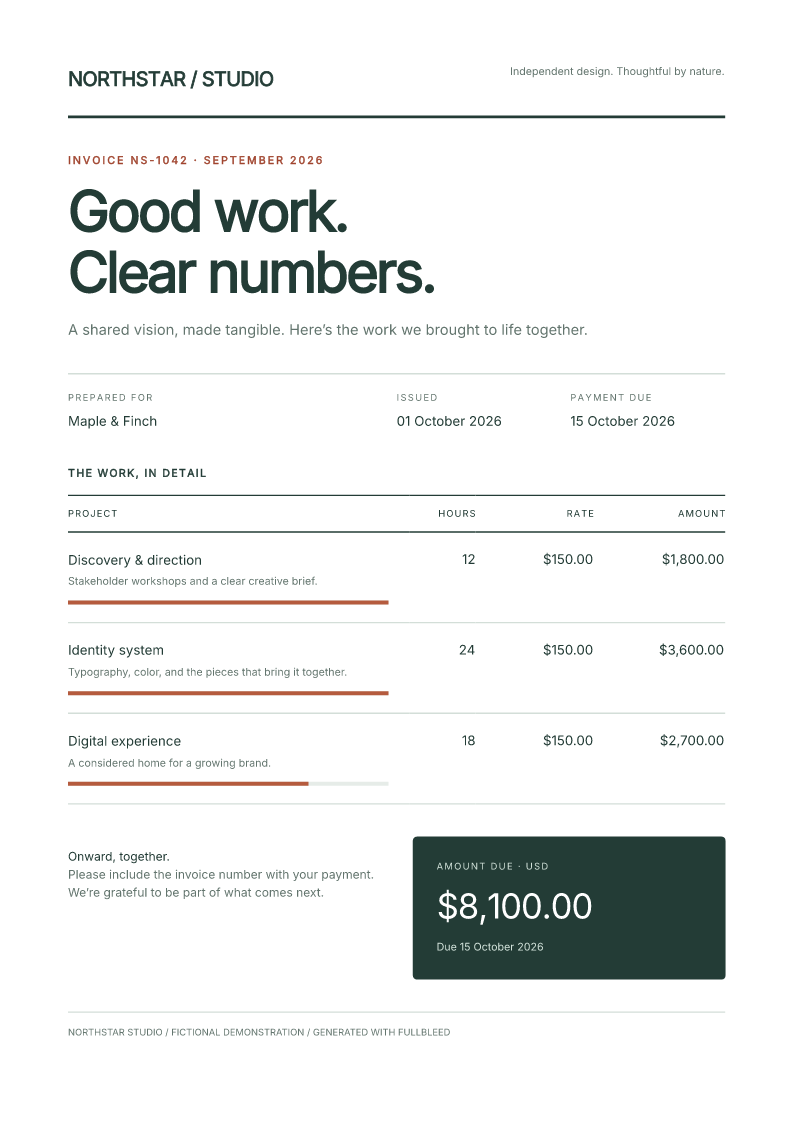
This example produces the same PDF bytes with embedded styles as its separately supplied HTML/CSS control. Its page and expected text were independently checked; that comparison covers this fixture, not general browser-layout parity.
Print rules and compiled templates
Embedded sheets use print media. A media="print" sheet applies; a
media="screen" sheet does not. Supported nested media queries, page rules,
margin boxes, and footnote-area rules follow the same print context. Styles
inside inert HTML <template> content are excluded.
The same embedded styles work with compile_pdf, previews, reporting methods,
and batches. Compilation captures the template's stylesheet sources. Recompile
when those sources change: inserting a new <style> through a structural
binding does not rebuild the compiled stylesheet. Batch outputs retain their
single-paper-size contract, initialized from the first record.
Check the installed engine
This guide targets the Python package. Other language packages can contain an older engine; check the capabilities of the package you installed before using the same behavior there.
External stylesheet links and CSS @import are not fetched, and JavaScript does
not execute. Supply external CSS through the explicit argument or AssetBundle.
Inline SVG still has a separate local styling pipeline; document selectors do
not propagate into SVG descendants.
See the full stylesheet contract for type filtering, preferred stylesheet sets, SVG boundaries, and structured diagnostics. The CSS coverage guide describes broader rendering support and known gaps.