Make the components your own
Change five styling controls in a complete Common Ground report. See which elements change, then download the PDF, styled HTML and unstyled HTML. The notebook includes every component definition and uses Python values for the content.
Open in Colab Download the notebook View the pinned source
Opt-in component preview: 2.6.0a10
The first cell installs fullbleed==2.6.0a10. The API under
fullbleed.ui.experimental remains experimental. Ordinary pip install
fullbleed selects the stable channel. The current preview guide
includes the complete source kit, API references and release evidence.
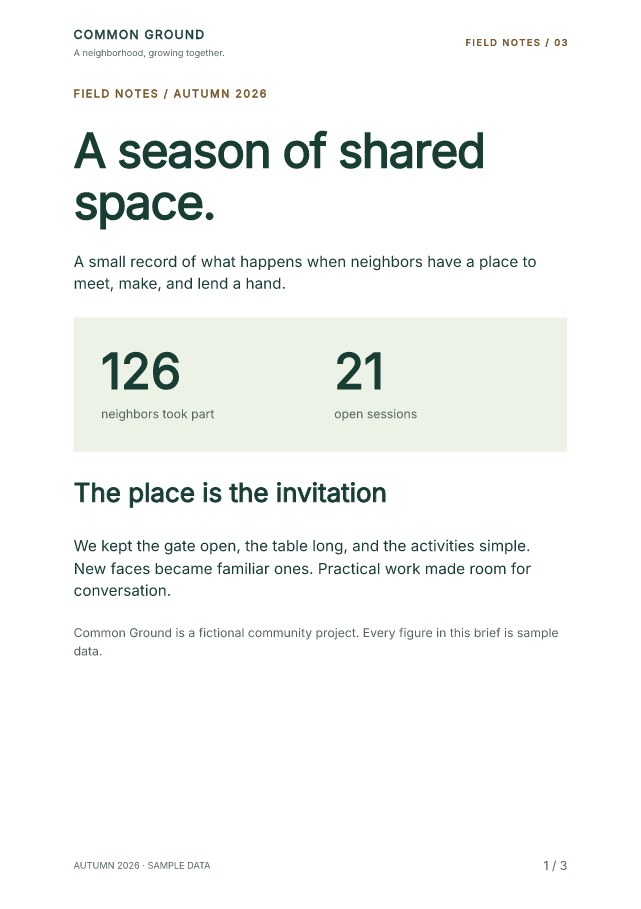
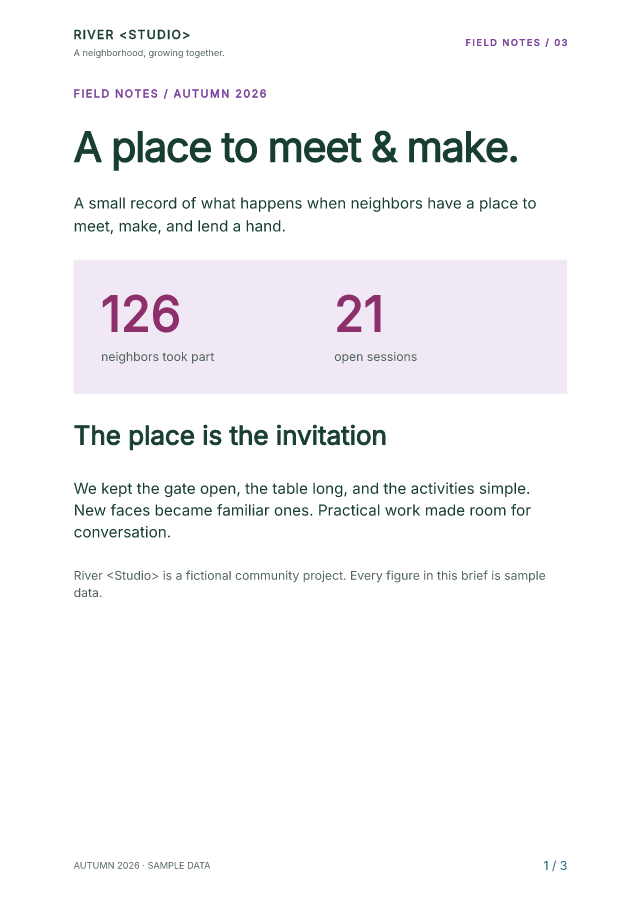
Open the sample PDF Open styled HTML Open unstyled HTML
Change one control at a time
Run all cells, then edit the values in step 2 and rerun from that cell through the download cell. Start with one color so its target is easy to spot.
| Control | Styling mechanism | Visible effect |
|---|---|---|
ACCENT |
Theme(...) and token("accent") |
Small uppercase labels |
TITLE_SIZE |
styled(Heading, ...) |
Large headings throughout the report |
PANEL_BACKGROUND |
.with_style(...) |
The first page's metrics panel |
METRIC_COLOR |
.with_parts(value=...) |
The two large metric values |
FOLIO_COLOR |
class_name and Document(styles=...) |
Page numbers in every footer |
To reproduce the edited palette above, use:
ACCENT = "#763c96"
TITLE_SIZE = 27
PANEL_BACKGROUND = "#f1e8f5"
METRIC_COLOR = "#8c2f6b"
FOLIO_COLOR = "#206b7a"
You can also edit PROJECT_NAME, HEADLINE and the ACTIVITY rows. All data
in the example is fictional.
Connect class_name to a rule
A class names a target; the matching style rule gives it an appearance.
The notebook places PageNumbers(class_name="folio", ...) in the footer and
defines this rule on its Document:
Use the dot in the selector, .folio, and omit it from class_name="folio".
A Python function's name does not create a selector. A class name does not
automatically load Bootstrap or another stylesheet.
The rule applies to the generated .folio element in PDF and styled HTML.
Unstyled HTML retains the class so another application can style it.
Customize the root or a named part
The Metric function declares value and label parts. Each instance can
customize its large number without restyling the label:
For the whole metrics panel, the notebook uses
.with_style(background=PANEL_BACKGROUND) on its Box. These calls return
new component values; they do not mutate other instances. Shared typography
belongs in Theme or a reusable styled(...) primitive.
The authoring reference explains precedence, supported styles and named parts.
Run in Colab or local Jupyter
In Colab, choose a standard CPU runtime and Runtime > Run all. Review the three default page previews, edit a control, rerun and save the ZIP. No GPU is needed. Colab's availability and usage limits apply.
For local Jupyter, download the notebook and open a terminal in its folder. Use Python 3.11 or later.
Wait for the kernel to connect, choose Run > Run All Cells, and click output/component-field-notes.zip in the final code cell. The ZIP contains the current PDF, both HTML forms and every current page preview.
For a longer report, replace ACTIVITY with:
That checked example has eight pages. Set ACTIVITY = [] and rerun to see
the empty table and a three-page result. The ZIP excludes previews left over
from a longer run.
Use the HTML elsewhere
document.to_html(include_styles=True) includes the resolved component and
document CSS. With include_styles=False, the export retains the semantic
structure and classes without style declarations. Your application can supply
its own stylesheet.
Both forms are static HTML. They use one header/main/footer sequence and
[page] / [pages] placeholders; they do not paginate the browser or add
Bootstrap JavaScript.
The PDF registers bundled Inter explicitly. That registration does not embed
Inter in browser HTML: the host must supply the font or use the included
sans-serif fallback. The notebook's @media screen rules frame the browser
document and map native Flow spacing to browser flex columns. A
browser_document reuses the same component content with those additional
host rules; the PDF document does not receive them. The
complete source kit includes an example
that writes the font file and a matching browser @font-face rule.
What the checks cover
The execution record covers six cases: default, edited text and styles, selector-only changes, named-part-only changes, 72 activity rows, and an empty table after the long run. Independent readers inspect all 23 PDF pages, including text, character bounds, colors and finalized page totals. Repeat renders, both HTML forms and ZIP contents are checked. The default PDF reproduces the qualified field-notes specimen exactly.
The style-isolation record
checks the rendered pixels: changing only .folio affects the footer on each
page; changing only the metric value part leaves pages two and three identical.
The Jupyter browser record covers editing the controls, running cells, displaying all previews and clicking the actual ZIP downloads. Those downloads match the independently inspected files. The checks cover local Jupyter, not execution in a hosted Colab session.
The PDF/UA-2 profile and source checks express authoring intent. Validate your own documents and include human assistive-technology review where needed. Repeated PDF bands sit outside body reading order, so essential information also belongs in the body.
The earlier page-band notebook and Bootstrap notebook retain their original pins and examples.