pandas reports with Python components
Keep the data preparation in pandas and build the report from reusable Python functions. This example turns the same fictional Gridline CSV used in the HTML/CSS pandas guide into a new three-page design: summary cards, a striped product ledger, repeated headers, and finalized page totals.
Pinned experimental API
This project uses the published Fullbleed 2.6.0a9 wheel and pandas 3.0.6. The component API is experimental. Keep the exact pin while evaluating it; the HTML/CSS example remains a separate stable-release path.
Download the PDF Get the runnable source Download both HTML exports
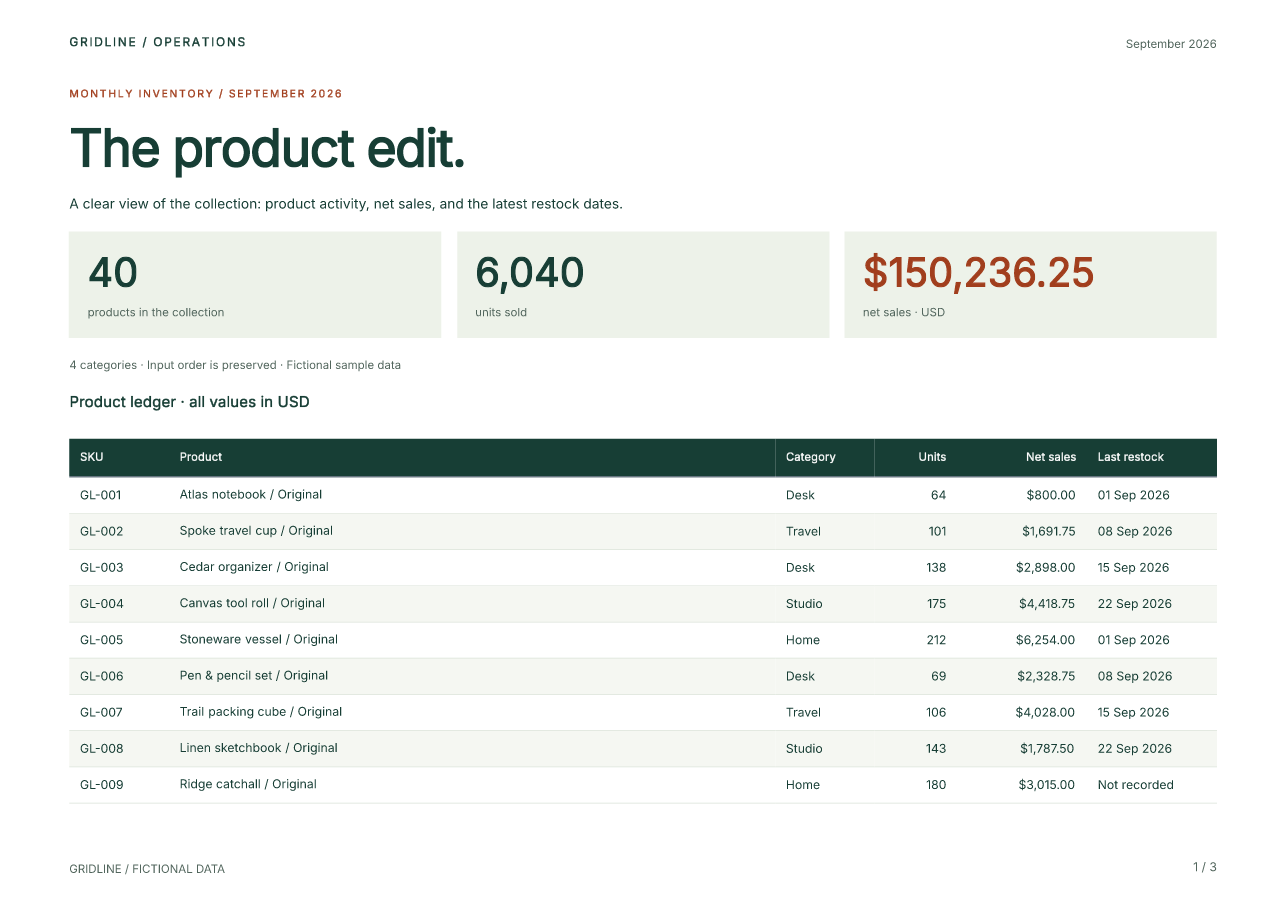
Preview page 2 · Preview page 3 · Inspect the verification record · Source checksums
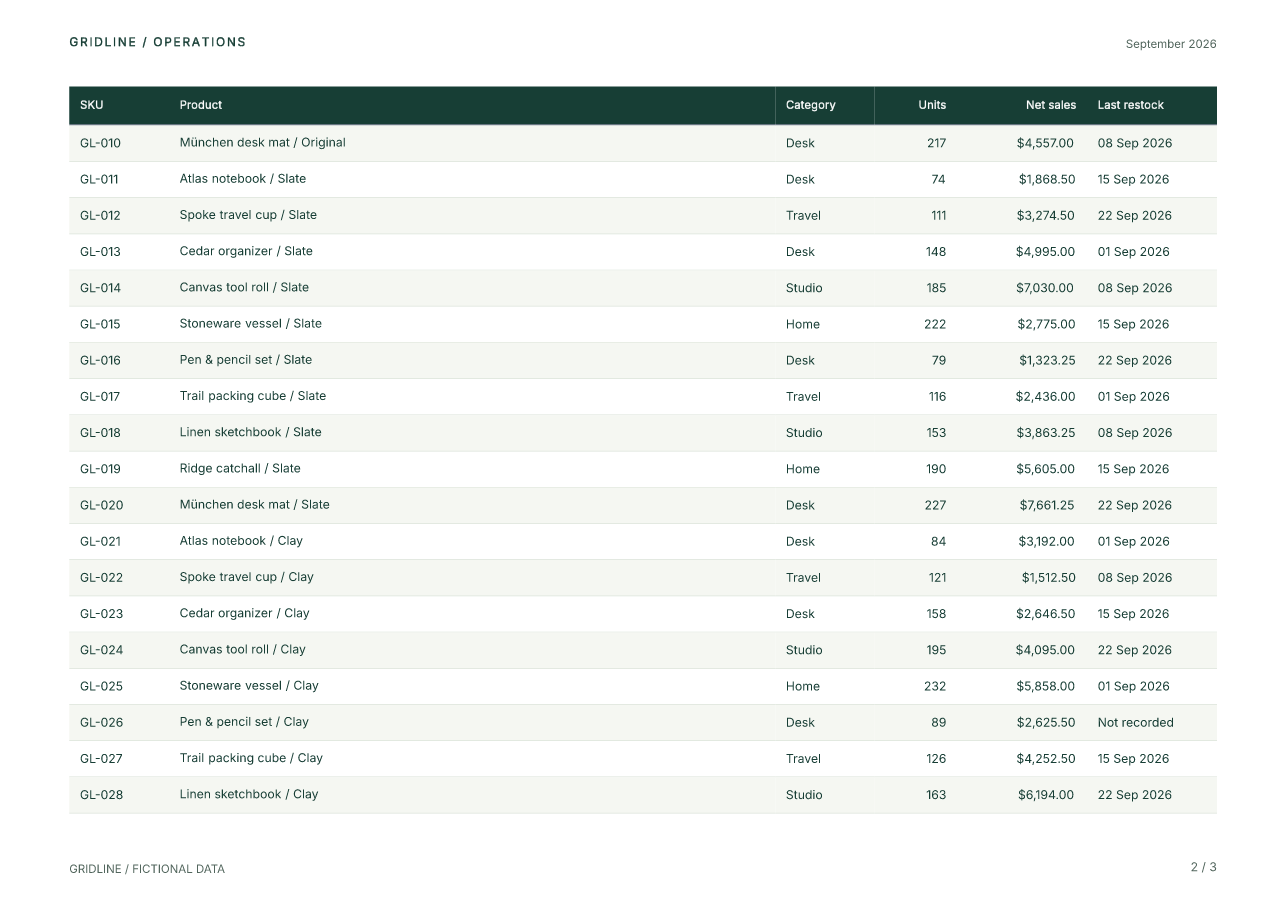
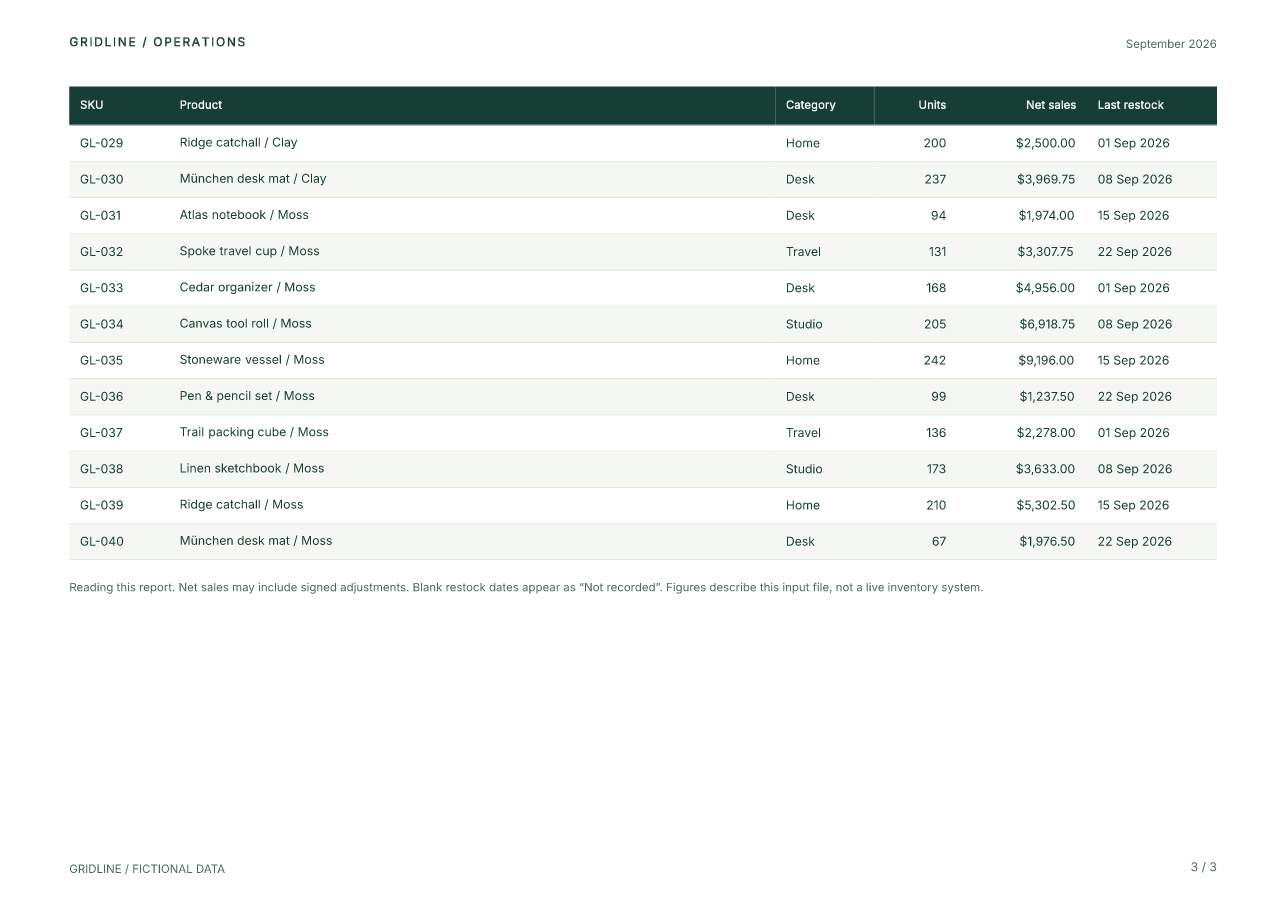
The previews come from the actual PDF. All data and the Gridline organization are fictional. This is a component-authored design using the earlier example's data; the two designs do not claim pixel parity.
Run the complete example
Extract the source ZIP and open its fullbleed-pandas-components directory. Use
Python 3.11 or later:
python -m venv .venv
# Windows: .venv\Scripts\activate
# macOS/Linux: source .venv/bin/activate
python -m pip install --only-binary=:all: -r requirements.txt
python report.py --previews
Open output/report.pdf. The command also writes styled HTML, unstyled HTML,
source structural diagnostics, pagination evidence, and optional PNG previews.
The published wheel includes the font and native renderer; PDF generation needs
no browser, system font, or remote asset.
python report.py --csv products.csv --title "The autumn edit." --period "Autumn 2026" --out output/autumn
Bridge a DataFrame to a table
data.py validates the CSV and preserves its row order. report.py calls:
Each Column callback receives one record. It can return text or another
component. Here is the core of the table in components.py:
from fullbleed.ui.experimental import Column, DataTable, Strong, mm
from data import dollars, restock

def Ledger(records):
    return DataTable(
        records,
        caption="Product ledger · all values in USD",
        columns=(
            Column("SKU", lambda row: row["sku"], width=mm(23)),
            Column("Product", lambda row: Strong(row["product"])),
            Column("Category", lambda row: row["category"], width=mm(23)),
            Column("Units", lambda row: f'{row["units"]:,}', align="right", width=mm(19)),
            Column("Net sales", lambda row: dollars(row["net_sales_cents"]), align="right", width=mm(30)),
            Column("Last restock", lambda row: restock(row["last_restock"]), width=mm(30)),
        ),
        class_name="ledger",
    )
The complete file adds header, caption, and cell styles with .with_parts().
The table supplies semantic column headers and repeats them across PDF pages.
Flow lets the document paginate; short metric cards use Stack internally.
Give reusable components a styling API
The metric is a Python function. Its two named parts let callers style the value or label without reaching through its implementation:
from fullbleed.ui.experimental import (
    Box, Paragraph, Stack, component, pt, style, token,
)
from components import Small

@component(parts=("value", "label"))
def Metric(value, label):
    return Box(
        Stack(
            Paragraph(value, part="value", style=style(
                font_size=pt(26), font_weight=700, line_height=1.15,
            )),
            Small(label, part="label"),
            gap=pt(5),
        ),
        style=style(background=token("paper"), padding=pt(12)),
    )

sales = Metric("$150,236.25", "net sales · USD").with_parts(
    value=style(color=token("accent")),
)
Theme defines the palette and shared typography. styled(Paragraph, ...)
creates the reusable Small and Kicker factories. Styles are immutable values;
an override produces a new component value.
What does class_name do?
class_name="ledger" attaches the class to the table. It applies no declarations
by itself. The document supplies the selector and its styles:
Document(
    ...,  # report components
    styles={
        ".ledger tbody tr:nth-child(even)": style(background="#f5f7f2"),
        ".folio": style(font_size=pt(8), color=token("muted")),
    },
)
Use a component's style= or .with_style() for one instance, styled() for a
reusable factory, and .with_parts() for its declared public parts. Use
class_name plus document selectors when a rule needs a selector, such as the
alternating rows above.
Repeat the brand and count the final pages
The document owns its page geometry. Its header and footer contain the same Python component values used in the body:
Page(
    "A4", landscape=True,
    margin=(mm(20), mm(16), mm(19), mm(16)),
    header=PageBand(left=Brand(), right=Small(period)),
    footer=PageBand(
        left=Small("GRIDLINE / FICTIONAL DATA"),
        right=PageNumbers(total=True, prefix="", separator=" / ", class_name="folio"),
    ),
)
PageNumbers uses the finalized page count. The 40-row sample produces 1 / 3
through 3 / 3; the 120-row check produces seven pages. Review your own content
after changing widths, fonts, data, or page size. An oversized row or page band
can raise a structured layout error.
Export HTML with or without styles
The same document can be used without PDF rendering:
document = build_report(frame)
styled_html = document.to_html(include_styles=True, a11y_mode="raise")
plain_html = document.to_html(include_styles=False, a11y_mode="raise")
True embeds the collected component CSS. False removes component CSS and
inline styles while retaining authored classes and semantic elements. The example's
export function also adds font loading and screen framing to the styled export;
keep its fonts/ directory beside the HTML. These are static browser documents,
with a single header and footer. Browser pagination does not reproduce PDF pages.
Keep presentation and data rules separate
The CSV contract is explicit: unique nonblank SKU, nonblank product and category,
nonnegative integer units, signed integer cents, and an ISO restock date or a
missing value. Additional columns are ignored. Decimal formats currency;
Python integers sum the amounts. Missing dates display “Not recorded”. Data
containing markup remains literal text, and building the report leaves the frame
unchanged. Normalize an existing DataFrame to this contract before authoring it.
Reproduce the checks
python -m pip install --only-binary=:all: -r requirements-check.txt
python verify.py --out output/verification
The checks save actual PDFs for 40 rows, one row, mixed long/Unicode/literal-markup values, and 120 rows. Independent readers check row order and completeness, repeated headings, page totals, and glyph bounds, and rasterize every page. Eight invalid input cases are rejected. A fresh Python process reproduces the sample's exact PDF bytes using the fixed timestamp and bundled font. Both HTML modes and unchanged input frames are also checked.
The PDF uses the tagged profile and passes source structural checks. These checks do not establish PDF/UA conformance or assistive-technology usability. For that separate workflow, see the accessible component showcase.
Continue with the current component preview, reusable page-band notebook, or HTML/CSS pandas report.