Personalize an existing PDF template
Keep your certificate, letterhead, or other fixed artwork as a PDF. Generate a transparent text overlay for each record, then compose the two pages into the finished document.
This Common Ground certificate pairs a reusable PDF background with names, workshop titles, dates, and certificate IDs from JSON. The download includes the background's HTML/CSS source as well as its ready-to-use PDF.
Open the three-page PDF Download the project
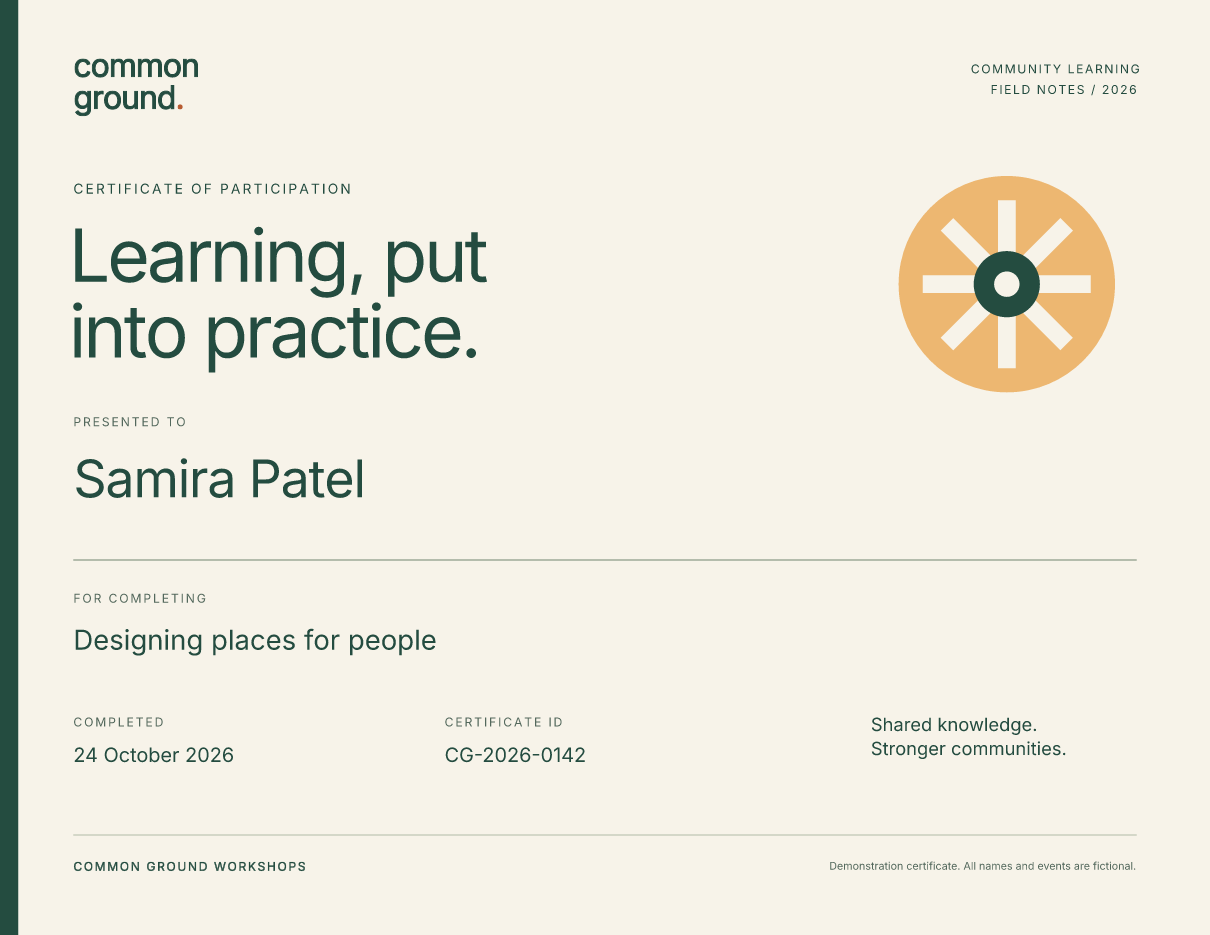
The fictional sample uses Fullbleed 2.5.39 and its bundled Inter font. The previews show the final composed PDF, including the background and overlay.
Run the example
Extract the ZIP, open fullbleed-pdf-template, and use Python 3.10 or newer in
a virtual environment:
Open output/certificates.pdf. The folder also holds the final page previews,
overlay.pdf, plan.json, and render.json with input hashes and checks for
repeatable composition and an unchanged source template. Choose a new output
folder for each run.
Rendering runs locally. It needs no browser, external rendering service, or system-font installation.
Change the records
Edit data.json. Each record becomes one page:
[
  {
    "name": "Samira Patel",
    "workshop": "Designing places for people",
    "completed_on": "2026-10-24",
    "certificate_id": "CG-2026-0142"
  }
]
Run python render.py --out output-edited and inspect the new PDF. The script
escapes text, rejects invalid records, and checks for missing font glyphs.
Names allow up to 48 characters, workshop titles 80, and IDs 20; longer values
within those limits use smaller type. Those limits are this design's layout
budget, so review longer names and titles in the final previews.
Position fields with CSS
The background is US Letter landscape: 792 × 612 points. The overlay uses the same page size and positions its fields from the top-left:
@page { size: 792pt 612pt; margin: 0; }
body { margin: 0; background: transparent; }
.certificate { position: relative; width: 792pt; height: 612pt; }
.name { position: absolute; left: 48pt; top: 295pt; width: 696pt; }
One inch is 72 points. Edit overlay.css to change field positions, sizes,
fonts, and colors. Avoid an opaque background on the overlay: it would cover
the original artwork.
Compose the pages
After rendering the overlay, the project's central operation is:
import fullbleed

templates = [("certificate", "template.pdf")]
plan = [
    ("certificate", 0, overlay_page, 0.0, 0.0)
    for overlay_page in range(len(records))
]

fullbleed.finalize_compose_pdf(
    templates,
    plan,
    "output/overlay.pdf",
    "output/certificates.pdf",
    annotation_mode="none",
)
Each plan entry contains the template ID, template page index, overlay page
index, and X/Y offsets. Page indexes start at zero. This example reuses template
page 0 for every record and uses zero offsets because both pages already
share the same dimensions.
The background remains PDF content rather than a screenshot. Review the final composed previews: an overlay-only preview cannot show alignment with the background. The composition reference covers catalogs, plans, and the CLI.
Use your own background
Supply a readable, unencrypted, unsigned, one-page PDF:
Use an unrotated page and adjust overlay.css to its dimensions and field
positions. The example checks readability, encryption, and page count; it
does not automatically check page geometry or align fields for you.
To edit the supplied artwork, change template.html and template.css, then
rebuild to a new file:
python build_template.py --out revised-template.pdf
python render.py --template revised-template.pdf --out output-revised
This workflow adds static content over artwork. It does not fill AcroForm fields, replace existing PDF text, preserve digital signatures, or establish tagging/accessibility. The example omits source annotations. For flowing content authored entirely in HTML/CSS, start with the invoice guide or variable-data guide.