One component tree, PDF and HTML
Write a Python function once, then reuse it across invoices, reports and repeating page headers. Compose semantic building blocks, attach their styles, and export PDF, styled HTML or unstyled HTML.
2.6.0a11 adds browser layout for Flow: its authored gaps work in styled
HTML without a separate layout rule. PDF output keeps native block pagination.
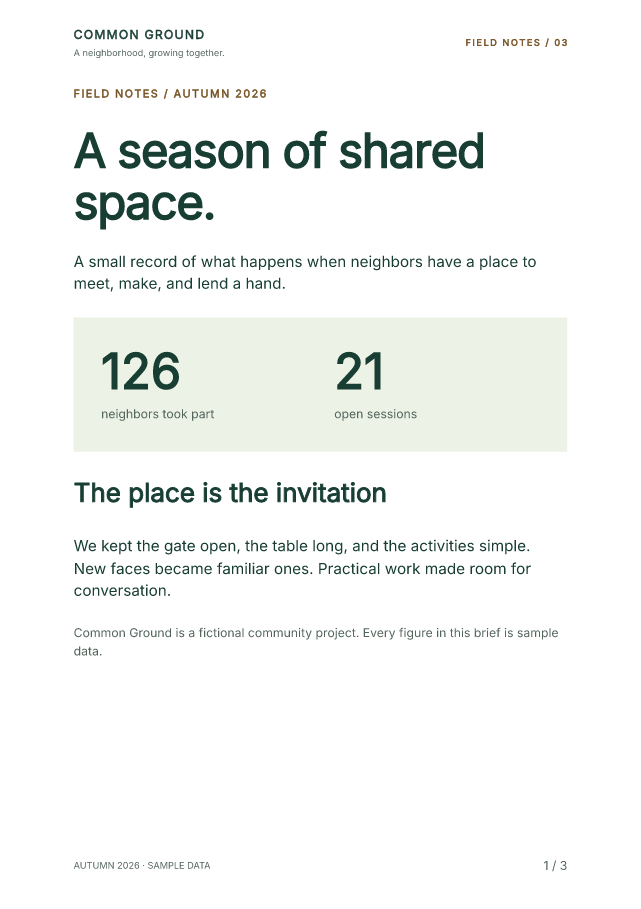
The source kit includes the Northstar invoice, Common Ground reports and an
authored accessible community guide.
Download the complete source kit Open the field-notes PDF Try the styling notebook
Install the preview explicitly
Use Python 3.10 or later in a virtual environment. The kit pins
fullbleed==2.6.0a11; ordinary pip install fullbleed selects the stable
channel. Components under fullbleed.ui.experimental may change.
Run the complete report
Extract the ZIP, open its fullbleed-component-showcases-2.6.0a11 folder, and run:
python -m pip install -r requirements.txt
python component_page_bands/render.py --out output/field-notes --pdf-profile pdfua2
Open output/field-notes/field-notes.pdf, field-notes.html, or
field-notes-unstyled.html. All content is fictional. Fonts come from the
pinned package or source kit; PDF generation does not need a browser or
system fonts.
Edit component_page_bands/report.py to change the report's components,
content and styles. Its Brand, Metric and NextStep functions are reusable
in other documents.
Compose and export
This complete example keeps its content and spacing in Python:
from importlib.resources import files
from pathlib import Path
from fullbleed.ui.experimental import (
    Document, Flow, Heading, Paragraph, Renderer, Theme, component, pt, style,
)

@component
def Summary(title, description):
    return Flow(
        Heading(title, level=1, style=style(font_size=pt(24))),
        Paragraph(description),
        gap=pt(18),
    )

document = Document(
    Summary("Project summary", "Prepared by Northstar Studio."),
    title="Project summary",
    lang="en-US",
    theme=Theme(text=style(font_family="Inter, sans-serif", font_size=pt(11))),
)
font = files("fullbleed_assets").joinpath("fonts/Inter-Variable.ttf")
renderer = Renderer(font_files=[str(font)])
Path("summary.pdf").write_bytes(document.render_pdf(renderer))
Path("summary.html").write_text(document.to_html(include_styles=True), encoding="utf-8")
Path("summary.unstyled.html").write_text(document.to_html(include_styles=False), encoding="utf-8")
The 18-point gap is part of Summary. Styled HTML includes the browser layout
that applies it; the host does not need to restyle every Flow. PDF-only
PageBreak markers are hidden in continuous styled HTML so they do not create
extra blank gaps.
Unstyled HTML retains semantic structure and class names without generated or inline styles. Another application can supply its own design. Both exports are static; no Bootstrap JavaScript is included.
Connect styles to components
class_name="folio" adds a class to the exported element. Define the matching
.folio rule in Document(styles=...) to give it an appearance. The dot belongs
in the selector. A Python function name does not create a CSS selector, and a
class name does not automatically load a stylesheet.
| Purpose | Authoring API |
|---|---|
| Shared typography and colors | Theme(...) on Document |
| Reuse a styled primitive | styled(...) |
| Style one instance | style=style(...) |
| Customize a component's root | .with_style(...) |
| Customize named internal elements | .with_parts(...) |
| Match a class | Document(styles={".folio": style(...)}) and class_name="folio" |
The editable notebook demonstrates all five styling paths with independent controls. The authoring reference explains precedence, named parts and the static Bootstrap 5.0.0 helpers.
Add page headers and numbers
The report uses Page(header=PageBand(...), footer=PageBand(...)) and
PageNumbers(total=True, class_name="folio"). The PDF repeats its bands and
finalizes values such as 1 / 3. HTML has one header, main and footer with
explicit [page] / [pages] placeholders.
Page reserves the margins; bands do not enlarge them automatically. The
page-band reference
covers left, center and right slots, first/blank-page policies, per-record
numbering and fit diagnostics. Register fonts explicitly so those checks can
use the actual glyphs.
Browser layout does not preview PDF pagination. Registering a font with
Renderer configures PDF output; browser HTML needs its own font URL or a
fallback. The source kit writes its font file and a matching @font-face rule.
Its remaining host CSS supplies screen framing.
Keep both authoring paths
The same kit includes component and HTML/CSS versions of the Northstar invoice and Common Ground report, plus the authored accessible guide:
python design_showcase/compare_authoring.py --out output/paired
python accessible_showcase/render.py --out output/accessible-ua1
python accessible_showcase/render.py --pdf-profile pdfua2 --out output/accessible-ua2
The paired command compares the rendered pages of the two authoring paths. The accessible guide demonstrates headings, captioned tables, column headers, lists and image descriptions. The paired-authoring walkthrough, accessible-guide walkthrough and Bootstrap catalog retain their versioned examples.
The alpha 10 guide retains the decoration-continuity
release. The alpha 9 guide retains the first
PageBand release and its original notebook.
Verification and scope
The release evidence records the source, package checksums, saved output and validation scope. Local qualification passes 370 component tests and 973 full Python tests. The source kit reproduces 11 PDFs using Fullbleed alone, and the styling notebook checks six editing scenarios across 23 pages, including actual browser ZIP downloads.
The 19 standalone Flow HTML fixtures exercise gaps, child margins, nested
components, fragments, style precedence and page-break markers. Native PDF
output and the reviewed showcase PDFs retain their previous bytes. Existing
independent PDF/UA receipts apply only to the identical saved specimens.
The final source-corpus comparison retains 1,623 passes, 21 failures and 18 disputed references. All 7,437 saved PDF/PNG files and every fixture verdict match alpha 10. The corpus guide links the complete evidence; the failed gate remains visible. This preview does not establish complete CSS conformance.
Repeated bands are artifacts outside the PDF body reading order. Keep essential identity and report details in the body as well. Profile selection and passing specimens do not establish accessibility for arbitrary documents or human assistive-technology usability. Fit checks are conservative; named/facing-page band variants are outside this API. Native streaming output is not atomic.